> ## Documentation Index
> Fetch the complete documentation index at: https://docs.aseeflow.org/llms.txt
> Use this file to discover all available pages before exploring further.
# Evaluate, Deploy, and Test the Decision Table
## Evaluate the decision table
To assess a decision table immediately after deployment, add this method to your application class:
```java theme={null}
package org.camunda.bpm.getstarted.dmn;
@ProcessApplication("Dinner App DMN")
public class DinnerApplication extends ServletProcessApplication {
protected final static Logger LOGGER = Logger.getLogger(DinnerApplication.class.getName());
@PostDeploy
public void evaluateDecisionTable(ProcessEngine processEngine) {
DecisionService decisionService = processEngine.getDecisionService();
VariableMap variables = Variables.createVariables()
.putValue("season", "Spring")
.putValue("guestCount", 10);
DmnDecisionTableResult dishDecisionResult = decisionService.evaluateDecisionTableByKey("dish", variables);
String desiredDish = dishDecisionResult.getSingleEntry();
LOGGER.log(Level.INFO, "\n\nDesired dish: {0}\n\n", desiredDish);
}
}
```
**Catch up: get the sources of Step-4**
```bash theme={null}
git clone https://github.com/aseeflow/aseeflow-get-started-dmn.git
git checkout -f Step-4
```
Or [download as a `.zip`](https://github.com/aseeflow/aseeflow-get-started-dmn/archive/Step-4.zip).
## Build the web application with Maven
In the Package Explorer, select `pom.xml`, right-click, and choose **Run As > Maven Install**. This generates a WAR file called `dinner-dmn-0.1.0-SNAPSHOT.war` in the `target/` directory.
If the WAR file doesn't appear after the Maven build, refresh the project in your IDE.
## Deploy to Apache Tomcat
Copy the `dinner-dmn-0.1.0-SNAPSHOT.war` file from your Maven project to `$ASEEFLOW_HOME/server/apache-tomcat/webapps`.
Examine the Apache Tomcat server logs. Successful deployment is indicated by:
```
INFO org.camunda.commons.logging.BaseLogger.logInfo
ENGINE-07015 Detected @ProcessApplication class 'org.camunda.bpm.getstarted.dish.DishApplication'
INFO org.camunda.commons.logging.BaseLogger.logInfo
ENGINE-08024 Found processes.xml file at ../webapps/dinner-dmn-0.1.0-SNAPSHOT/WEB-INF/classes/META-INF/processes.xml
INFO org.camunda.commons.logging.BaseLogger.logInfo
ENGINE-08023 Deployment summary for process archive 'dinner-dmn':
dinnerDecisions.dmn
INFO org.camunda.bpm.getstarted.dmn.DinnerApplication.evaluateDecisionTable
Desired dish: Stew
INFO org.camunda.commons.logging.BaseLogger.logInfo
ENGINE-08050 Process application Dinner App DMN successfully deployed
```
## Verify the deployment with Cockpit
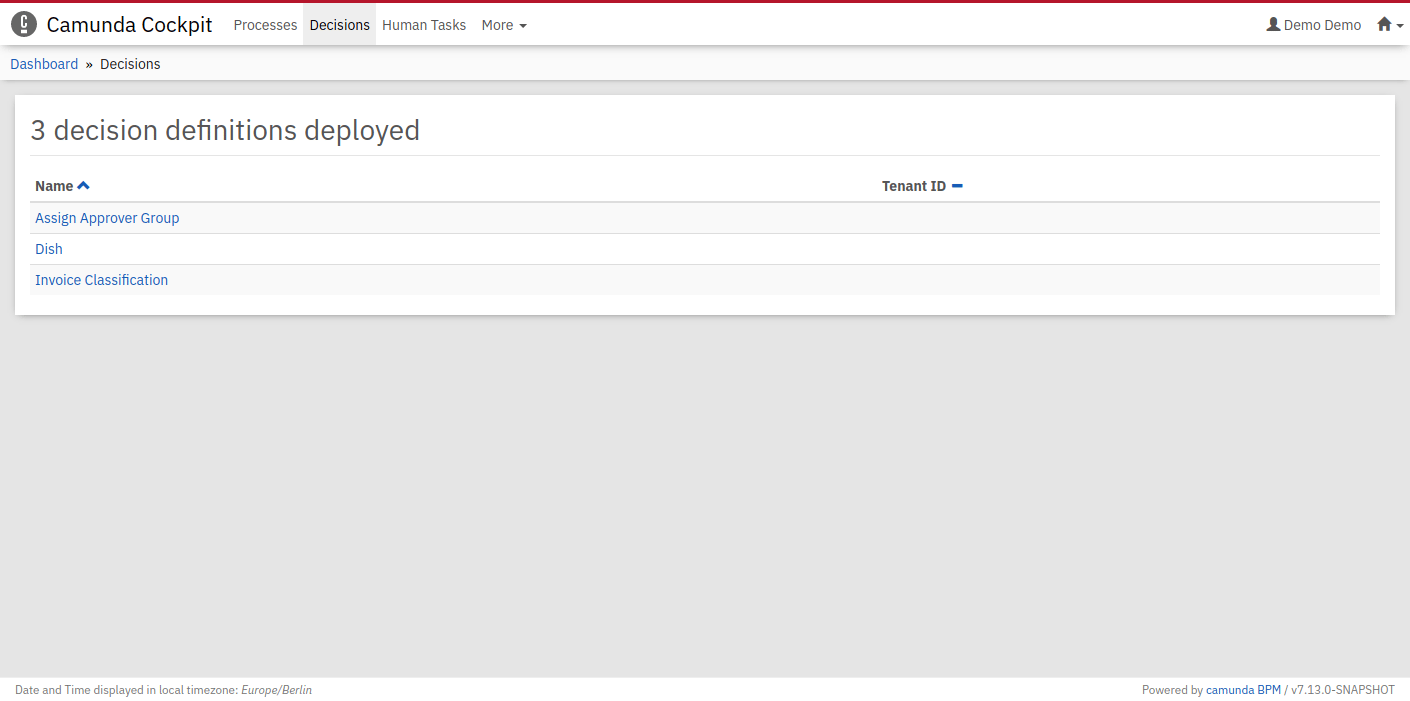
Access Cockpit at [http://localhost:8080/camunda/app/cockpit](http://localhost:8080/camunda/app/cockpit). Log in with `demo` / `demo`. Navigate to the *Decisions* section, where your *Dish* decision table should appear as a deployed decision definition.
 ## Verify the evaluation with Cockpit
Select the *Dish* decision to open a dialog displaying when the decision table was evaluated.
## Verify the evaluation with Cockpit
Select the *Dish* decision to open a dialog displaying when the decision table was evaluated.
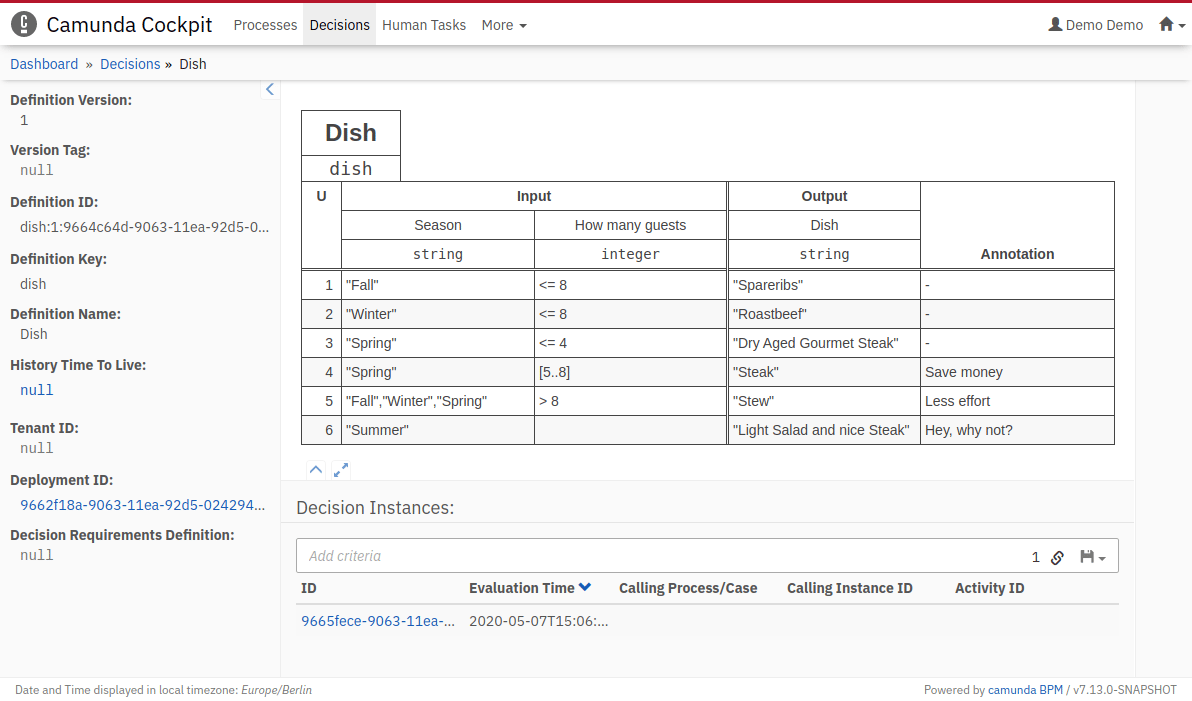 Clicking the ID reveals the evaluation's historical data. Matched rules are highlighted, with input and output values presented in a table.
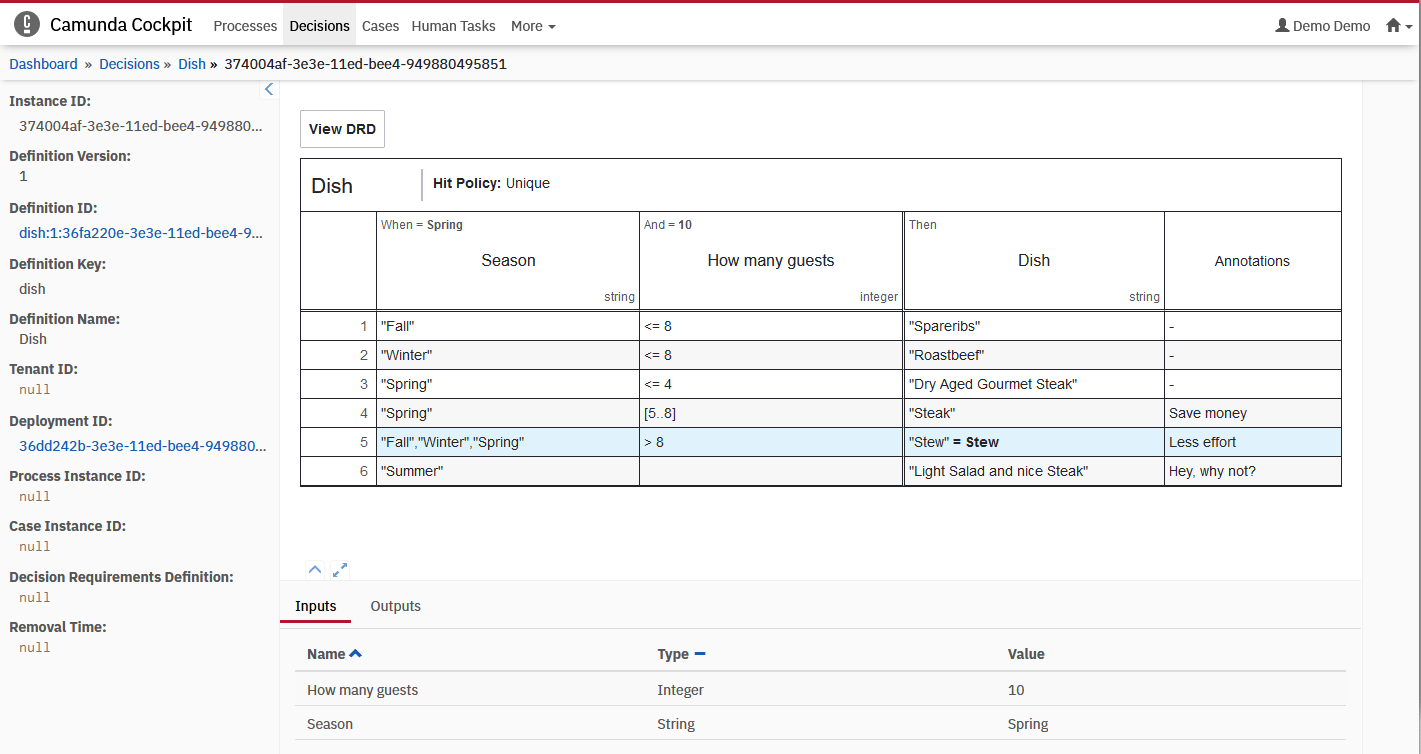 Confirm that the 5th rule matched and *Stew* appears as the desired dish output value.
## Next steps
You've successfully established a project featuring your first DMN decision table. Consider these follow-up activities:
* Review decision evaluation using the [REST API](/reference/rest/decision-definition/evaluate-by-key)
* Deepen your DMN knowledge through the [DMN Reference](/reference/dmn)
* Explore the [Decision API of the process engine](/user-guide/process-engine/decisions)
* Discover how to trigger decisions from a [BPMN business rule task](/reference/bpmn20/tasks/business-rule-task)
* Bonus: learn about the [Decision Requirements Graph](/get-started/dmn/drg)
Confirm that the 5th rule matched and *Stew* appears as the desired dish output value.
## Next steps
You've successfully established a project featuring your first DMN decision table. Consider these follow-up activities:
* Review decision evaluation using the [REST API](/reference/rest/decision-definition/evaluate-by-key)
* Deepen your DMN knowledge through the [DMN Reference](/reference/dmn)
* Explore the [Decision API of the process engine](/user-guide/process-engine/decisions)
* Discover how to trigger decisions from a [BPMN business rule task](/reference/bpmn20/tasks/business-rule-task)
* Bonus: learn about the [Decision Requirements Graph](/get-started/dmn/drg)