> ## Documentation Index
> Fetch the complete documentation index at: https://docs.aseeflow.org/llms.txt
> Use this file to discover all available pages before exploring further.
# History time to live
Each execution of a model resource (BPMN, DMN, and CMMN) generates historic data during execution that is stored in the database. In ASEE Flow, [history cleanup](/user-guide/process-engine/history) removes this historic data from the database based on a defined **history time to live (HTTL)**.
You must configure HTTL in one of the following ways:
* Define HTTL per model directly in Desktop Modeler.
* Set a default HTTL via an engine configuration.
* Switch off the HTTL check via an engine configuration if history cleanup is not used.
### Values
Process instances are only cleaned up if their corresponding definition has a valid time to live (TTL). Use the `historyTimeToLive` extension attribute of the process definition to define the TTL for all its instances:
``
TTL can also be defined in ISO-8601 date format. The function only accepts the notation to define the number of days.
``
Refer to the [ASEE Flow documentation regarding case definitions](/user-guide/process-engine/history/history-cleanup) for additional details.
Time to live must be defined under **History cleanup** in the properties panel on the right side of the screen.
### History time to live not configured
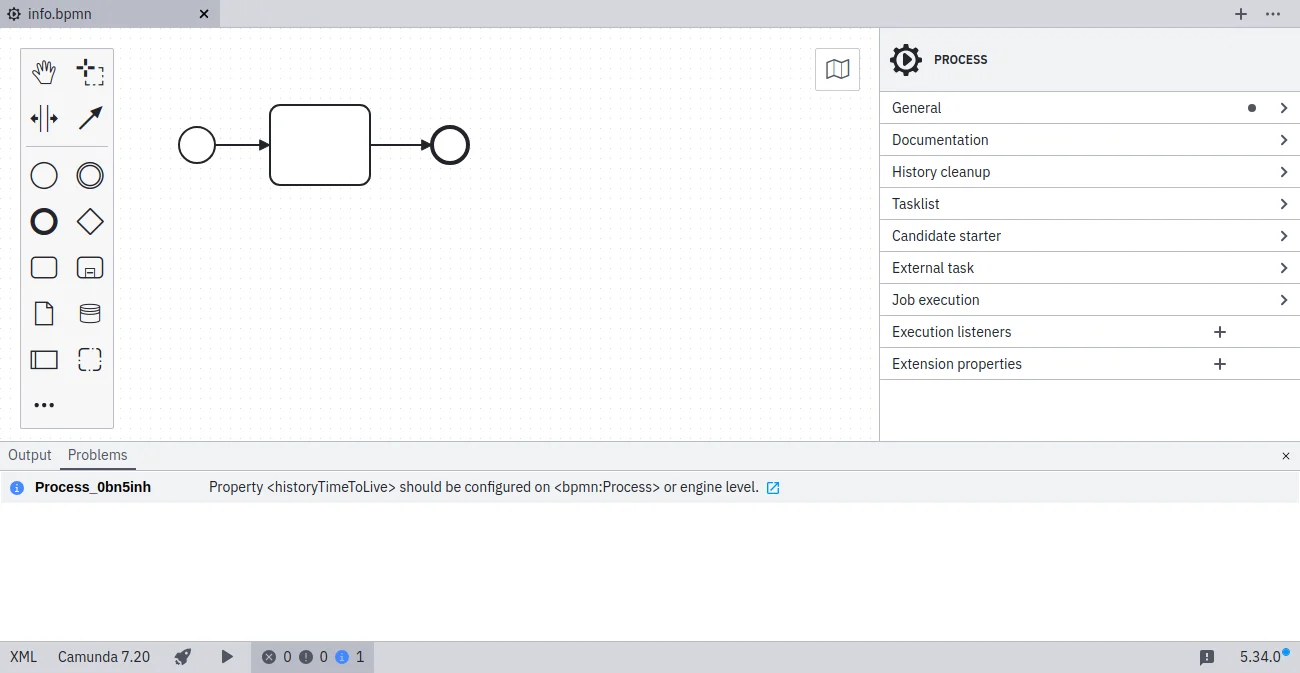 In the screenshot above, note that the time to live must be defined under **History cleanup** in the properties panel on the right side of the screen.
### References
* [History documentation](/user-guide/process-engine/history)
* [Rule source](https://github.com/camunda/bpmnlint-plugin-camunda-compat/blob/main/rules/camunda-platform/history-time-to-live.js)
In the screenshot above, note that the time to live must be defined under **History cleanup** in the properties panel on the right side of the screen.
### References
* [History documentation](/user-guide/process-engine/history)
* [Rule source](https://github.com/camunda/bpmnlint-plugin-camunda-compat/blob/main/rules/camunda-platform/history-time-to-live.js)