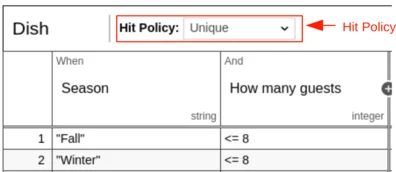
 A decision table has a hit policy that specifies what the
results of the evaluation of a decision table consist of.
The hit policy is set in the `hitPolicy` attribute on the `decisionTable` XML
element. If no hit policy is set, then the default hit policy `UNIQUE` is used.
```xml theme={null}
A decision table has a hit policy that specifies what the
results of the evaluation of a decision table consist of.
The hit policy is set in the `hitPolicy` attribute on the `decisionTable` XML
element. If no hit policy is set, then the default hit policy `UNIQUE` is used.
```xml theme={null}
| Hit Policy | XML representation |
|---|---|
| Unique | UNIQUE |
| Any | ANY |
| First | FIRST |
| Rule order | RULE ORDER |
| Collect | COLLECT |
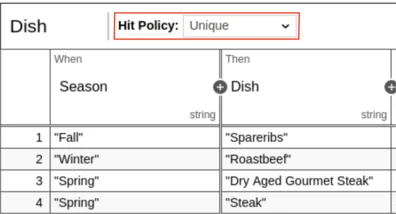 Depending on the current season the dish should be chosen.
Only one dish can be chosen, since only one season can exist at the same time.
### Any Hit Policy
Multiple rules can be satisfied. However, all satisfied rules must generate the same
output. The decision table result contains only the output of one of the
satisfied rules.
If multiple rules are satisfied which generate different outputs, the hit policy
is violated.
See the following example:
Depending on the current season the dish should be chosen.
Only one dish can be chosen, since only one season can exist at the same time.
### Any Hit Policy
Multiple rules can be satisfied. However, all satisfied rules must generate the same
output. The decision table result contains only the output of one of the
satisfied rules.
If multiple rules are satisfied which generate different outputs, the hit policy
is violated.
See the following example:
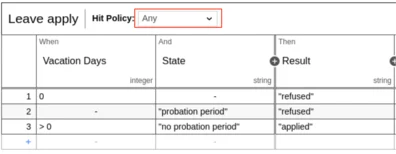 This is a decision table for the leave application. If the applier
has no vacation days left or is currently in the probation period, the application will be refused.
Otherwise the application is applied.
### First Hit Policy
Multiple rules can be satisfied. The decision table result contains only
the output of the first satisfied rule.
This is a decision table for the leave application. If the applier
has no vacation days left or is currently in the probation period, the application will be refused.
Otherwise the application is applied.
### First Hit Policy
Multiple rules can be satisfied. The decision table result contains only
the output of the first satisfied rule.
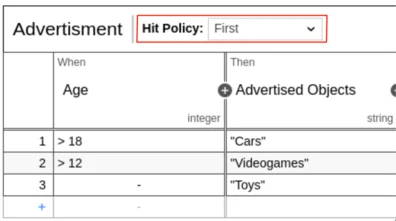 See the above decistion table for advertisement. Regarding the current age of the user, which
advertisement should be shown is decided. For example, the user is 19 years old. All the rules will match, but since
the hit policy is set to first only, the advertisement for Cars is used.
### Rule Order Hit Policy
Multiple rules can be satisfied. The decision table result contains the output
of all satisfied rules in the order of the rules in the decision table.
See the above decistion table for advertisement. Regarding the current age of the user, which
advertisement should be shown is decided. For example, the user is 19 years old. All the rules will match, but since
the hit policy is set to first only, the advertisement for Cars is used.
### Rule Order Hit Policy
Multiple rules can be satisfied. The decision table result contains the output
of all satisfied rules in the order of the rules in the decision table.
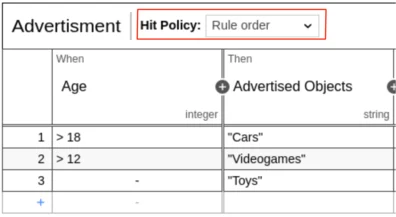 Again, see the advertisement example with the rule order policy. Say we have a user at the age of 19 again.
All rules are satisfied so all outputs are given, ordered by the rule ordering.
It can perhaps be used to indicate the priority of the displayed advertisements.
### Collect Hit Policy
Multiple rules can be satisfied. The decision table result contains the output
of all satisfied rules in an arbitrary order as a list.
Again, see the advertisement example with the rule order policy. Say we have a user at the age of 19 again.
All rules are satisfied so all outputs are given, ordered by the rule ordering.
It can perhaps be used to indicate the priority of the displayed advertisements.
### Collect Hit Policy
Multiple rules can be satisfied. The decision table result contains the output
of all satisfied rules in an arbitrary order as a list.
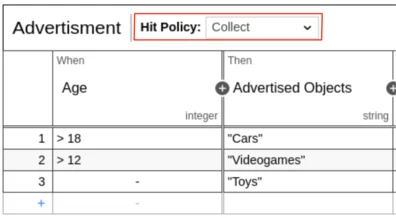 With this hit policy, the output list has no ordering. So the advertisement will be arbitrary
if, for example, the age is 19.
Additionally, an aggregator can be specified for the Collect hit policy. If an
aggregator is specified, the decision table result will only contain a single
output entry. The aggregator will generate the output entry from all satisfied
rules. **Note** if the Collect hit policy is used with an aggregator, the
decision table can only have one output.
The aggregator is set as the `aggregation` attribute of the `decisionTable`
XML element.
```xml theme={null}
With this hit policy, the output list has no ordering. So the advertisement will be arbitrary
if, for example, the age is 19.
Additionally, an aggregator can be specified for the Collect hit policy. If an
aggregator is specified, the decision table result will only contain a single
output entry. The aggregator will generate the output entry from all satisfied
rules. **Note** if the Collect hit policy is used with an aggregator, the
decision table can only have one output.
The aggregator is set as the `aggregation` attribute of the `decisionTable`
XML element.
```xml theme={null}
| Visual representation | XML representation | Result of the aggregation |
|---|---|---|
| Collect (Sum) | SUM | the sum of all output values |
| Collect (Min) | MIN | the smallest value of all output values |
| Collect (Max) | MAX | the largest value of all output values |
| Collect (Count) | COUNT | the number of output values |
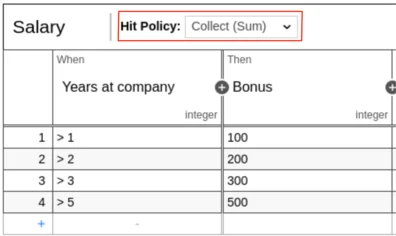 The showed decision table can be used to sum up the salary bonus for an employee. For example, the employee has been working in the company for
3.5 years. So the first, second and third rule will match and the result of the decision table is 600, since the output is summed up.
##### MIN aggregator
The MIN aggregator can be used to return the smallest output value of all satisfied rules.
See the following example of a car insurance. After years without a car crash the insurance fee will be reduced.
The showed decision table can be used to sum up the salary bonus for an employee. For example, the employee has been working in the company for
3.5 years. So the first, second and third rule will match and the result of the decision table is 600, since the output is summed up.
##### MIN aggregator
The MIN aggregator can be used to return the smallest output value of all satisfied rules.
See the following example of a car insurance. After years without a car crash the insurance fee will be reduced.
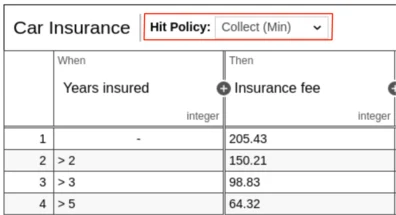 For example, if the input for the decision table is 3.5 years, the result will be 98.83, since the first three rules match
but the third rule has the minimal output.
##### MAX aggregator
The MAX aggregator can be used to return the largest output value of all satisfied rules.
For example, if the input for the decision table is 3.5 years, the result will be 98.83, since the first three rules match
but the third rule has the minimal output.
##### MAX aggregator
The MAX aggregator can be used to return the largest output value of all satisfied rules.
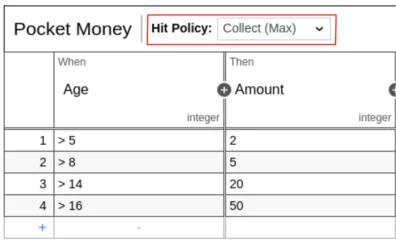 This decision table represents the decision for the amount of pocket money for a child.
Depending of the age, the amount grows. For example, an input of 9 will satisfy the first and second rules.
The output of the second rule is larger then the output of the first rule, so the output
will be 5. A child at the age of 9 will get 5 as pocket money.
##### COUNT aggregator
The COUNT aggregator can be use to return the count of satisfied rules.
This decision table represents the decision for the amount of pocket money for a child.
Depending of the age, the amount grows. For example, an input of 9 will satisfy the first and second rules.
The output of the second rule is larger then the output of the first rule, so the output
will be 5. A child at the age of 9 will get 5 as pocket money.
##### COUNT aggregator
The COUNT aggregator can be use to return the count of satisfied rules.
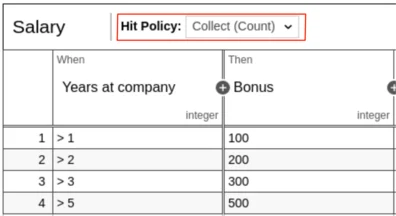 For example, see the salary bonus decision table again, this time with the COUNT aggregator.
With an input of 4, the first three rules will be satisfied. Therefore, the result from the decision table will be 3, which means
that after 4 years the result of the decision table is 3 salary bonuses.
[decision table result]: /user-guide/dmn-engine/evaluate-decisions#interpret-the-dmndecisiontableresult
[Unique]: #unique-hit-policy
[Any]: #any-hit-policy
[First]: #first-hit-policy
[Rule Order]: #rule-order-hit-policy
[Collect]: #collect-hit-policy
For example, see the salary bonus decision table again, this time with the COUNT aggregator.
With an input of 4, the first three rules will be satisfied. Therefore, the result from the decision table will be 3, which means
that after 4 years the result of the decision table is 3 salary bonuses.
[decision table result]: /user-guide/dmn-engine/evaluate-decisions#interpret-the-dmndecisiontableresult
[Unique]: #unique-hit-policy
[Any]: #any-hit-policy
[First]: #first-hit-policy
[Rule Order]: #rule-order-hit-policy
[Collect]: #collect-hit-policy