> ## Documentation Index
> Fetch the complete documentation index at: https://docs.aseeflow.org/llms.txt
> Use this file to discover all available pages before exploring further.
# History cleanup
When used intensively, the process engine can produce a huge amount of historic data. *History Cleanup* is a feature that removes this data based on configurable time-to-live settings.
It deletes:
* Historic process instances plus all related historic data (e.g., historic variable instances, historic task instances, historic instance permissions, all comments and attachments related to them, etc.)
* Historic decision instances plus all related historic data (i.e., historic decision input and output instances)
* Historic case instances plus all related historic data (e.g., historic variable instances, historic task instances, etc.)
* Historic batches plus all related historic data (historic incidents and job logs)
History cleanup can be triggered manually or scheduled on a regular basis. Only [camunda-admins](/user-guide/process-engine/authorization-service#the-camunda-admin-group) have permissions to execute history cleanup manually.
### Use case example
Assume we have a billing process for which we must keep the history trail for ten years for legal compliance reasons. Then we have a holiday application process for which history data is only relevant for a short time. In order to reduce the amount of data we have to store, we want to quickly remove holiday-related data.
With history cleanup, we can assign the billing process a history time to live of ten years and the holiday process a history time to live of seven days. History cleanup then makes sure that history data is removed when the time to live has expired. This way, we can selectively keep history data based on its importance for our business. At the same time, we only keep what is necessary in the database.
Note: The exact time at which data is removed depends on a couple of configuration settings, for example the selected *history cleanup strategy*. The underlying concepts and settings are explained in the following sections.
### Basic concepts
#### Cleanable instances
The following elements of ASEE Flow history are cleanable:
* Process Instances
* Decision Instances
* Case Instances
* Batches
Note that cleaning one such instance always removes all dependent history data along with it. For example, cleaning a process instance removes the historic process instance as well as all historic activity instances, historic task instances, etc.
**Note**
The history clean up job does not delete historic [timer-start-event](/reference/bpmn20/events/timer-events#timer-start-event) jobs. The reason being that the responsibility of timer-start-event job is to start a process instance, i.e. it does not belong to a process instance.
#### History Time To Live (TTL)
*History Time To Live* (TTL) defines how long historic data shall remain in the database before it is cleaned up.
* Process, Case and Decision Instances: TTL can be defined in the XML file of the corresponding definition. This value can furthermore be changed after deployment via Java and REST API.
* Batches: TTL can be defined in the process engine configuration.
See the [TTL configuration section](#history-time-to-live) for how to set TTL.
#### Instance end time
*End Time* is the time when an instance is no longer active.
* Process Instances: The time when the instance finishes.
* Decision Instances: The time when the decision is evaluated.
* Case Instances: The time when the instance completes.
* Batches: The time when the batch completes.
The end time is persisted in the corresponding instance tables `ACT_HI_PROCINST`, `ACT_HI_CASEINST`, `ACT_HI_DECINST` and `ACT_HI_BATCH`.
#### Instance removal time
*Removal Time* is the time after which an instance shall be removed. It is computed as `removal time = base time + TTL`. *Base time* is configurable and can be either the start or the end time of an instance. In particular, this means:
* Process Instances: Base time is either the time when the process instance starts or the time at which it finishes. This is configurable.
* Decision Instances: Base time is the time when the decision is evaluated.
* Case Instances: The removal time concept is not implemented for case instances.
* Batches: Base time is either the time when the batch is created or when the batch is completed. This is configurable.
For process and decision instances in a hierarchy (e.g. a process instance that is started by another process instance via a BPMN Call Activity), the removal time of all instances is always equal to the removal time of the root instance.
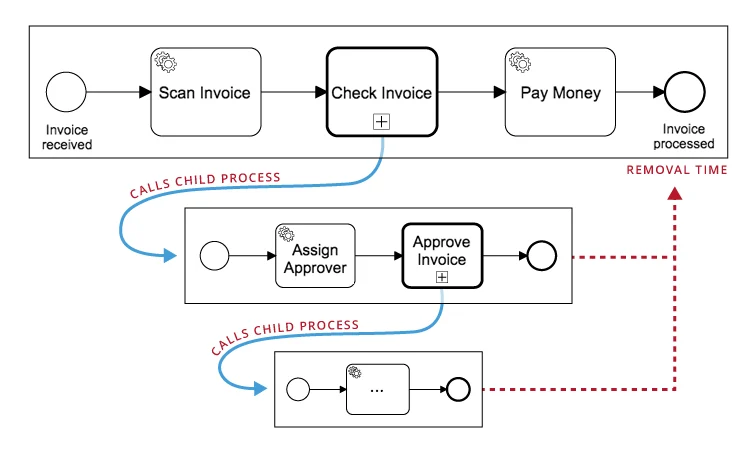 The removal time is persisted in *all* history tables. So in case of a process instance, the removal time is present in `ACT_HI_PROCINST` as well as the corresponding secondary entries in `ACT_HI_ACTINST`, `ACT_HI_TASKINST` etc.
See the [Removal Time Strategy configuration section](#removal-time-strategy) for how to configure if the removal time is based on the start or end time of an instance.
### Cleanup strategies
In order to use history cleanup, you must decide for one of the two avialable history cleanup strategies: *Removal-Time-based* or *End-Time-based* strategy. The *Removal-Time-based* strategy is the default strategy and recommended in most scenarios. The following sections describe the strategies and their differences in detail. See the [Cleanup Strategy configuration section](#cleanup-strategy) for how to configure each of the strategies.
#### Removal-time-based strategy
The *removal-time-based cleanup strategy* deletes data for which the removal time has expired.
Strengths:
* Since every history table has a removal time attribute, history cleanup can be done with simple `DELETE FROM
The removal time is persisted in *all* history tables. So in case of a process instance, the removal time is present in `ACT_HI_PROCINST` as well as the corresponding secondary entries in `ACT_HI_ACTINST`, `ACT_HI_TASKINST` etc.
See the [Removal Time Strategy configuration section](#removal-time-strategy) for how to configure if the removal time is based on the start or end time of an instance.
### Cleanup strategies
In order to use history cleanup, you must decide for one of the two avialable history cleanup strategies: *Removal-Time-based* or *End-Time-based* strategy. The *Removal-Time-based* strategy is the default strategy and recommended in most scenarios. The following sections describe the strategies and their differences in detail. See the [Cleanup Strategy configuration section](#cleanup-strategy) for how to configure each of the strategies.
#### Removal-time-based strategy
The *removal-time-based cleanup strategy* deletes data for which the removal time has expired.
Strengths:
* Since every history table has a removal time attribute, history cleanup can be done with simple `DELETE FROM WHERE REMOVAL_TIME_ < ` SQL statements. This is much more efficient than end-time-based cleanup.
* Since removal time is consistent for all instances in a hierarchy, a hierarchy is always cleaned up entirely once the removal time has expired. It cannot happen that instances are removed at different times.
Limitations:
* Changing the TTL of a definition only applies to history data that is created in the future. It does not dynamically update the removal time of already written history data. However, it is possible to [Set a Removal Time via Batch Operations](/user-guide/process-engine/batch-operations#set-a-removal-time).
* History data of case instances is not cleaned up.
#### End-time-based strategy
The *end-time-based cleanup strategy* deletes data whose end time plus TTL has expired. In contrast to the removal-time strategy, this is computed whenever history cleanup is performed.
Strengths:
* Changing the TTL of a definition also affects already written history data.
* Can remove data from any ASEE Flow version.
Limitations:
* End time is only stored in the instances tables (`ACT_HI_PROCINST`, `ACT_HI_CASEINST`, `ACT_HI_DECINST` and `ACT_HI_BATCH`). To delete data from all history tables, the cleanable instances are first fetched via a `SELECT` statement. Based on that, `DELETE` statements are made for each history table. These statements can involve joins. This is less efficient than removal-time-based history cleanup.
* Instance hierarchies are not cleaned up atomically. Since the individual instances have different end times, they are going to be cleaned up at different times. In consequence, hierarchies can appear partially removed.
* [Historic Instance Permissions](/user-guide/process-engine/authorization-service#historic-instance-permissions) are not cleaned up.
* History Cleanup Jobs are not removed from the historic job log.
### Cleanup internals
History cleanup is implemented via jobs and performed by the [job executor](/user-guide/process-engine/the-job-executor). It therefore competes for execution resources with other jobs, e.g. triggering of BPMN timer events.
Cleanup execution can be controlled in three ways:
* Cleanup Window: Determines a time frame in which history cleanup runs. This allows to use the job executor's resources only when there is little load on your system (e.g. at night time or weekends). Default value: No cleanup window is defined. That means that history cleanup is not performed automatically.
* Batch Size: Determines how many instances are cleaned up in one cleanup transaction. Default: 500.
* Degree of Parallelism: Determines how many cleanup jobs can run in parallel. Default: 1 (no parallel execution).
See the [Cleanup configuration section](#configuration) for how to set each of these values.
If there is no cleanable data left, the cleanup job performs exponential backoff between runs to reduce system load. This backoff is limited to a maximum of one hour. Backoff does not apply to manual cleanup runs.
If cleanup fails, the job executor's [retry mechanism](/user-guide/process-engine/the-job-executor#failed-jobs) applies. Once the cleanup job has run out of retries, it is not executed again until one of the following actions is performed:
* History cleanup is triggered manually
* The process engine is restarted (this resets the number of job retries to the default value)
* The number of job retries is increased manually (e.g. via Java or REST API)
The history cleanup jobs can be found via the API method `HistoryService#findHistoryCleanupJobs`.
### Configuration
#### History Time To Live
##### Required property
The history time to live is mandatory, any deployment or re-deployment of any model resource (BPMN, DMN, CMMN) that contains a historyTimeToLive of null will be prevented. Unless explicitly disabled via [process engine configuration](/reference/deployment-descriptors/tags/process-engine#enforceHistoryTimeToLive). To define a default TTL for process definitions and decision definitions if no other value is defined check [historyTimeToLive configuration](/reference/deployment-descriptors/tags/process-engine#historytimetolive).
##### Process/decision/case definitions
Process instances are only cleaned up if their corresponding definition has a valid time to live (TTL).
Use the ["historyTimeToLive" extension attribute](/reference/bpmn20/custom-extensions/extension-attributes#historytimetolive) of the process definition to define the TTL for all its instances:
```xml theme={null}
...
```
TTL can also be defined in ISO-8601 date format. The function only accepts the notation to define the number of days.
```xml theme={null}
...
```
Once deployed, TTL can be updated via Java API:
```java theme={null}
processEngine.getRepositoryService().updateProcessDefinitionHistoryTimeToLive(processDefinitionId, 5);
```
Setting the value to `null` clears the TTL. The same can be done via [REST API](/reference/rest/process-definition/update-history-time-to-live-1).
For decision and case definitions, TTL can be defined in a similar way.
In case you want to provide an engine-wide default TTL for all process, decision and case definitions,
use the ["historyTimeToLive" attribute](/reference/deployment-descriptors/tags/process-engine#historytimetolive)
of the process engine configuration. This value is applied as the default whenever new definitions without TTL are deployed. Note that it therefore does not change the TTL of already deployed definitions. Use the API method given above to change TTL in this case.
##### Batches
TTL for batches can be defined via attribute of the process engine configuration.
```xml theme={null}
P5D
```
The `batchOperationsForHistoryCleanup` property can be configured in Spring based application or via custom [Process Engine Plugins](/user-guide/process-engine/process-engine-plugins). It defines history time to live for each specific historic batch operation.
```xml theme={null}
```
If the specific TTL is not set for a batch operation type, then the option `batchOperationHistoryTimeToLive` applies.
##### Job logs
A history cleanup is always performed by executing a history cleanup job. As with all other jobs, the history cleanup job
will produce events that are logged in the historic job log. By default, those entries will stay in the log indefinitely
and cleanup must be configured explicitly. Please note that this only works for the [removal-time based history cleanup strategy](/user-guide/process-engine/history/history-cleanup#removal-time-strategy).
The `historyCleanupJobLogTimeToLive` property can be used to define a TTL for historic job log entries produced by
history cleanup jobs. The property accepts values in the ISO-8601 date format. Note that only the notation to define a number of days is allowed.
```xml theme={null}
P5D
```
##### Task metrics
The process engine reports [runtime metrics](/user-guide/process-engine/metrics) to the database that can help draw conclusions about usage, load, and performance of the BPM platform.
With every assignment of a user task, the related task worker is stored as a pseudonymized, fixed-length value in the `ACT_RU_TASK_METER_LOG` table together with a timestamp. Cleanup for this data needs to
be configured explicitly if needed.
The `taskMetricsTimeToLive` property can be used to define a TTL for task metrics entries produced by user task assignments.
The property accepts values in the ISO-8601 date format. Note that only the notation to define a number of days is allowed.
```xml theme={null}
P540D
```
#### Cleanup window
For automated history cleanup on a regular basis, a batch window must be configured - the period of time during the day when the cleanup is to run.
Use the following engine configuration properties to define a batch window for every day of the week:
```xml theme={null}
20:00
06:00
```
Cleanup can also be scheduled individually for each day of the week (e.g. run cleanup only on weekends):
```xml theme={null}
20:00
06:00
06:00
06:00
06:00
06:00
```
By default, no cleanup window is configured. In that case, history cleanup is not performed automatically.
See the [engine configuration reference][configuration-options] for a complete list of all parameters.
#### Cleanup strategy
Removal-time-based or end-time-based cleanup can be selected as follows:
```xml theme={null}
removalTimeBased
```
Valid values are `removalTimeBased` and `endTimeBased`. `removalTimeBased` is the default.
#### Removal-time strategy
Removal time is defined per instance as `removal time = base time + TTL`. `base time` can be either the start or end time of the instance in case of process instances. This can be configured in the process engine configuration as follows:
```xml theme={null}
end
```
Valid values are `start`, `end` and `none`. `end` is the default value and the recommended option. `start` is a bit more efficient when the process engine populates the history tables, because it does not have to make extra `UPDATE` statements when an instance finishes.
**Note:**: With `historyRemovalTimeStrategy` set to `start`, it is possible to delete historic data of running process instances. When a process is started the removal time will be calculated (start+TTL) and will be set for all the activities of the process. As soon as removal time is reached data from historic tables gets cleaned up irrespective of whether the instance is running or completed. This may lead to the removal of the historic data before the process instance is finished resulting in no available history in Cockpit or history tables. A mitigation strategy is to choose a longer TTL value or set `historyRemovalTimeStrategy` to `end`.
**Heads-up!**
The calculation of the removal time can be enabled independently of the selected cleanup strategy of the process engine.
This allows to perform a custom cleanup procedure outside the process engine by leveraging database capabilities (e.g. via table partitioning by removal time).
#### Parallel execution
The degree of parallel execution for history cleanup can be defined in the engine configuration as follows:
```xml theme={null}
4
```
Valid values are integers from 1 to 8. 1 is the default value.
This property specifies the number of jobs used for history cleanup. In consequence, this value determines how many job executor threads and database connections may be busy with history cleanup at once. Choosing a high value can make cleanup faster, but may steal resources from other tasks the engine and database have to perform.
#### Cleanup batch size
The number of instances that are removed in one cleanup transaction can be set as follows:
```xml theme={null}
100
```
The default (and maximum) value is 500. Reduce it if you notice transaction timeouts during history cleanup.
#### Clustered cleanup
In a multi-engine setup, you can configure whether a specific engine should participate in history cleanup or not.
Please make sure that the same cleanup execution configuration (window, batch size, degree of parallelism) is present
on all participating nodes.
##### Cleanup execution participation per node
Sometimes it is necessary to exclude some nodes in a multi-engine setup from performing history cleanup execution,
e. g. to reduce the load on some nodes.
You can disable the history cleanup execution for each node with the following flag:
```xml theme={null}
false
```
When you exclude a node from executing history cleanup, you don't need to specify the configuration properties
related to the cleanup execution since the particular node ignores them.
**Please Note:** The history cleanup configuration properties that are unrelated to the cleanup execution (e.g.,
time to live, removal time strategy) still need to be defined among all nodes.
[configuration-options]: /reference/deployment-descriptors/tags/process-engine#history-cleanup-configuration-parameters