> ## Documentation Index
> Fetch the complete documentation index at: https://docs.aseeflow.org/llms.txt
> Use this file to discover all available pages before exploring further.
# Process Versioning
## Versioning of Process Definitions
Business Processes are by nature long running. The process instances will maybe last for weeks, or months. In the meantime the state of the process instance is stored to the database. But sooner or later you might want to change the process definition even if there are still running instances.
This is supported by the process engine:
* If you redeploy a changed process definition, you get a new version in the database.
* Running process instances will continue to run in the version they were started in.
* New process instances will run in the new version - unless specified explicitly.
* Support for migrating process instances to new a version is supported within certain limits.
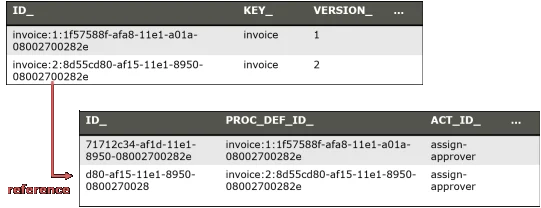
You can see different versions in the process definition table and the process instances are linked to this:
 **Multi-Tenancy**
If you are using [multi-tenancy with tenant identifiers](/user-guide/process-engine/multi-tenancy#single-process-engine-with-tenant-identifiers) then each tenant has its own process definitions which have versions independent from other tenants. See the [multi-tenancy section](/user-guide/process-engine/multi-tenancy#versioning-of-tenant-specific-definitions) for details.
## Which Version Will be Used
When you start a process instance
* By **key**: It starts an instance of the **latest deployed version** of the process definition with the key.
* By **id**: It starts an instance of the deployed process definition with the database id. By using this you can start a **specific version**.
The default and recommended usage is to use `startProcessInstanceByKey` and always use the latest version:
```java theme={null}
processEngine.getRuntimeService().startProcessInstanceByKey("invoice");
// will use the latest version (2 in our example)
```
If you want to specifically start an instance of an old process definition, use a Process Definition Query to find the correct ProcessDefinition id and use `startProcessInstanceById`:
```java theme={null}
ProcessDefinition pd = processEngine.getRepositoryService().createProcessDefinitionQuery()
.processDefinitionKey("invoice")
.processDefinitionVersion(1).singleResult();
processEngine.getRuntimeService().startProcessInstanceById(pd.getId());
```
When you use [BPMN CallActivities](/reference/bpmn20/subprocesses/call-activity) you can configure which version is used:
```xml theme={null}
```
or
```xml theme={null}
```
The options are
* latest: Use the latest version of the process definition (as with `startProcessInstanceByKey`).
* deployment: Use the process definition in the version matching the version of the calling process. This works if they are deployed within one deployment - as they are then always versioned together (see [Process Application Deployment](/user-guide/process-applications/the-processes-xml-deployment-descriptor#process-application-deployment) for more details).
* version: Specify the version hard coded in the XML.
* versionTag: Specify the versionTag hard coded in the XML.
## Key vs. ID of a Process Definition
You might have spotted that two different columns exist in the process definition table with different meanings:
* Key: The key is the unique identifier of the process definition in the XML, so its value is read from the id attribute in the XML:
```xml theme={null}
pdList = processEngine.getRepositoryService().createProcessDefinitionQuery()
.versionTag("1.5-patch2")
.list();
```
You can also use `versionTagLike` to query for a range of versions:
```java theme={null}
List pdList = processEngine.getRepositoryService().createProcessDefinitionQuery()
.versionTagLike("1.5-%")
.list();
```
The following example shows how to start a process instance of the latest process
definition for a version tag:
```java theme={null}
ProcessDefinition pd = processEngine.getRepositoryService().createProcessDefinitionQuery()
.processDefinitionKey("invoice")
.versionTag("1.5-patch2")
.orderByVersion().
.desc()
.listPage(0,1);
processEngine.getRuntimeService().startProcessInstanceById(pd.getId());
```
**Version Tag**
The version tag is only for tagging and will neither influence the `startProcessInstanceByKey`
nor the `startProcessInstanceById` behavior.
**Latest Version**
The Process Definition `version` and `versionTag` are separate properties. When querying with
`ProcessDefinitionQuery#latestVersion()`, the Process Definition with the largest `version` number is located for
a given key. Adding a version tag filter to this query might provide an empty result if the latest Process Definition
doesn't contain the queried version tag.
## Process Instance Migration
By default, when a new process version is deployed, process instances running on previous versions are not affected.
[Process instance migration](/user-guide/process-engine/process-instance-migration) can be used
to migrate process instances to a new version.
**Multi-Tenancy**
If you are using [multi-tenancy with tenant identifiers](/user-guide/process-engine/multi-tenancy#single-process-engine-with-tenant-identifiers) then each tenant has its own process definitions which have versions independent from other tenants. See the [multi-tenancy section](/user-guide/process-engine/multi-tenancy#versioning-of-tenant-specific-definitions) for details.
## Which Version Will be Used
When you start a process instance
* By **key**: It starts an instance of the **latest deployed version** of the process definition with the key.
* By **id**: It starts an instance of the deployed process definition with the database id. By using this you can start a **specific version**.
The default and recommended usage is to use `startProcessInstanceByKey` and always use the latest version:
```java theme={null}
processEngine.getRuntimeService().startProcessInstanceByKey("invoice");
// will use the latest version (2 in our example)
```
If you want to specifically start an instance of an old process definition, use a Process Definition Query to find the correct ProcessDefinition id and use `startProcessInstanceById`:
```java theme={null}
ProcessDefinition pd = processEngine.getRepositoryService().createProcessDefinitionQuery()
.processDefinitionKey("invoice")
.processDefinitionVersion(1).singleResult();
processEngine.getRuntimeService().startProcessInstanceById(pd.getId());
```
When you use [BPMN CallActivities](/reference/bpmn20/subprocesses/call-activity) you can configure which version is used:
```xml theme={null}
```
or
```xml theme={null}
```
The options are
* latest: Use the latest version of the process definition (as with `startProcessInstanceByKey`).
* deployment: Use the process definition in the version matching the version of the calling process. This works if they are deployed within one deployment - as they are then always versioned together (see [Process Application Deployment](/user-guide/process-applications/the-processes-xml-deployment-descriptor#process-application-deployment) for more details).
* version: Specify the version hard coded in the XML.
* versionTag: Specify the versionTag hard coded in the XML.
## Key vs. ID of a Process Definition
You might have spotted that two different columns exist in the process definition table with different meanings:
* Key: The key is the unique identifier of the process definition in the XML, so its value is read from the id attribute in the XML:
```xml theme={null}
pdList = processEngine.getRepositoryService().createProcessDefinitionQuery()
.versionTag("1.5-patch2")
.list();
```
You can also use `versionTagLike` to query for a range of versions:
```java theme={null}
List pdList = processEngine.getRepositoryService().createProcessDefinitionQuery()
.versionTagLike("1.5-%")
.list();
```
The following example shows how to start a process instance of the latest process
definition for a version tag:
```java theme={null}
ProcessDefinition pd = processEngine.getRepositoryService().createProcessDefinitionQuery()
.processDefinitionKey("invoice")
.versionTag("1.5-patch2")
.orderByVersion().
.desc()
.listPage(0,1);
processEngine.getRuntimeService().startProcessInstanceById(pd.getId());
```
**Version Tag**
The version tag is only for tagging and will neither influence the `startProcessInstanceByKey`
nor the `startProcessInstanceById` behavior.
**Latest Version**
The Process Definition `version` and `versionTag` are separate properties. When querying with
`ProcessDefinitionQuery#latestVersion()`, the Process Definition with the largest `version` number is located for
a given key. Adding a version tag filter to this query might provide an empty result if the latest Process Definition
doesn't contain the queried version tag.
## Process Instance Migration
By default, when a new process version is deployed, process instances running on previous versions are not affected.
[Process instance migration](/user-guide/process-engine/process-instance-migration) can be used
to migrate process instances to a new version.