> ## Documentation Index
> Fetch the complete documentation index at: https://docs.aseeflow.org/llms.txt
> Use this file to discover all available pages before exploring further.
# The ASEE Flow WildFly Subsystem
**Installation Guide**
If you download a full distribution from the ASEE Flow customer repository (see [Accessing artifacts](/introduction/downloading-aseeflow#accessing-artifacts)), the ASEE Flow Wildfly subsystem is readily installed into the application server.
[Read the installation guide](/installation/full/jboss) to learn how to install the ASEE Flow Wildfly subsystem into your Wildfly Server.
ASEE Flow provides advanced integration for Wildfly in the form of a custom [Wildfly Subsystem](https://docs.wildfly.org/23/Extending_WildFly.html).
The most prominent features are:
* Deploy the process engine as shared Wildfly module.
* Configure the process engine in `standalone.xml` / `domain.xml` and administer it though the JBoss Management System.
* Process Engines are native JBoss Services with service lifecycles and dependencies.
* Automatic deployment of BPMN 2.0 processes (through the Process Application API).
* Use a managed Thread Pool for the Job Executor configured through the ASEE Flow Subsystem.
## Configure the Job Executor in standalone.xml/domain.xml
The configuration of the thread pool used by the Job Executor is done in the ASEE Flow subsystem.
The thread pool creation and shutdown is now controlled through the ASEE Flow subsystem.\
You are able to configure it through the following new configuration elements below the `job-executor` element of the subsystem XML configuration.
Mandatory configuration elements are:
* `3`
* `5`
* `10`
Optional configuration elements are:
* `10` (in seconds)
* `true`
Shown values are the default ones.
For a complete list of all configuration options, please refer to the [Job Executor Configuration](/reference/deployment-descriptors/tags/job-executor).
## Configure a Process Engine in standalone.xml/domain.xml
Using the ASEE Flow Wildfly subsystem, it is possible to configure and manage the process engine through the JBoss Management Model. The most straightforward way is to add the process engine configuration to the `standalone.xml` file of the Wildfly Server:
```xml theme={null}
java:jboss/datasources/ProcessEngine
full
default
true
true
3
5
10
300000
5000
3
```
It should be easy to see that the configuration consists of a single process engine which uses the Datasource `java:jboss/datasources/ProcessEngine` and is configured to be the `default` process engine. In addition, the job executor currently uses a single Job Acquisition, also named default.
If you start up your Wildfly server with this configuration, it will automatically create the corresponding services and expose them through the management model.
For a complete list of all configuration options, please refer to the [Process Engine Configuration](/reference/deployment-descriptors/tags/process-engine).
## Provide a Custom Process Engine Configuration Class
It is possible to provide a custom Process Engine Configuration class on a Wildfly Application Server. To this extent, provide the fully qualified classname of the class in the `standalone.xml` file:
```xml theme={null}
java:jboss/datasources/ProcessEngine
org.my.custom.ProcessEngineConfiguration
full
true
300000
5000
```
The class `org.my.custom.ProcessEngineConfiguration` must be a subclass of `org.camunda.bpm.engine.impl.cfg.JtaProcessEngineConfiguration`.
The properties map can be used for invoking primitive valued setters (Integer, String, Boolean) that follow the Java Bean conventions. In the case of the example above, the
class would provide a method named
```java theme={null}
public void setMyCustomProperty(boolean boolean) {
...
}
```
**Module dependency of custom configuration class**
If you configure the process engine in `standalone.xml` and provide a custom configuration class packaged inside an own module, the camunda-wildfly-subsystem module needs to have a module dependency on the module providing the class.
If you fail to do this, you will see the following error log:
```console theme={null}
Caused by: org.camunda.bpm.engine.ProcessEngineException: Could not load 'foo.bar': the class must be visible from the camunda-wildfly-subsystem module.
at org.camunda.bpm.container.impl.jboss.service.MscManagedProcessEngineController.createProcessEngineConfiguration(MscManagedProcessEngineController.java:187) [camunda-wildfly-subsystem-{{< minor-version >}}.0.jar:]
at org.camunda.bpm.container.impl.jboss.service.MscManagedProcessEngineController.startProcessEngine(MscManagedProcessEngineController.java:138) [camunda-wildfly-subsystem-{{< minor-version >}}.0.jar:]
at org.camunda.bpm.container.impl.jboss.service.MscManagedProcessEngineController$3.run(MscManagedProcessEngineController.java:126) [camunda-wildfly-subsystem-{{< minor-version >}}.0.jar:]
```
## Extend a Process Engine Using Process Engine Plugins
It is possible to extend a process engine using the process engine plugins concept.
You specify the process engine plugins in `standalone.xml`/`domain.xml` for each process engine separately as shown below:
```xml theme={null}
java:jboss/datasources/ProcessEngine
full
...
org.camunda.bpm.engine.MyCustomProcessEnginePlugin
10
true
akka
...
```
You have to provide the fully qualified classname between the `` tags. Additional properties can be specified using the `` element.
The restrictions which apply for [providing a custom process engine configuration class](#provide-a-custom-process-engine-configuration-class) are also valid for process engine plugins:
* Plugin class must be visible in the classpath for the ASEE Flow subsystem.
* Properties map can be used for invoking primitive valued setters (Integer, String, Boolean) that follow the Java Bean conventions.
## Using System Properties
To externalize environment specific parts of the configuration, it is possible to reference system properties using Ant-style expressions (i.e., `${PROPERTY_KEY}`).
Expression resolution is supported for all elements and attributes except for the `name` attribute on the elements `process-engine` and `job-acquisition`.
System properties may be set via command line (`-D`option). Read more on expressions in the documentation for [WildFly](http://docs.wildfly.org/23/Extending_WildFly.html#expressions).
### Example
```xml theme={null}
org.camunda.bpm.engine.impl.plugin.AdministratorAuthorizationPlugin
${camunda.administratorUserName}
```
## Look Up a Process Engine in JNDI
The ASEE Flow Wildfly subsystem provides the same [JNDI bindings for the ProcessApplicationService and the ProcessEngineService](/user-guide/runtime-container-integration/jndi-bindings-for-bpmn-platform-services) as provided on other containers. In addition, the ASEE Flow Wildfly subsystem creates JNDI Bindings for all managed process engines, allowing us to look them up directly.
The global JNDI bindings for process engines follow the pattern
```java theme={null}
java:global/camunda-bpm-platform/process-engine/$PROCESS_ENGINE_NAME
```
If a process engine is named "engine1", it will be available using the name `java:global/camunda-bpm-platform/process-engine/engine1`.
Note that when looking up the process engine, using a declarative mechanism (like `@Resource` or referencing the resource in a deployment descriptor) is preferred over a programmatic way. The declarative mechanism makes the application server aware of our dependency on the Process Engine Service and allows it to manage that dependency for us. See also: [Managing Service Dependencies](#explicit-service-dependencies).
A declarative mechanism like `@Resource` could be
```java theme={null}
@Resource(mappedName = "java:global/camunda-bpm-platform/process-engine/$PROCESS_ENGINE_NAME")
```
**Look Up a Process Engine From JNDI Using Spring**
On Wildfly, Spring users should always [create a resource-ref for the process engine in web.xml](#manage-service-dependencies) and then lookup the local name in the `java:comp/env/` namespace. [For an example, see this Quickstart](https://github.com/camunda/camunda-bpm-examples/tree/master/deployment/spring-wildfly-non-pa)
## Manage the Process Engine Through the JBoss Management System
To inspect and change the management model, we can use [one of the multiple WildFly Management Clients available](https://docs.wildfly.org/23/Admin_Guide.html#Management_Clients).
### Inspect the Configuration
It is possible to inspect the configuration using the CLI (Command Line Interface, jboss-cli.bat/sh):
```console theme={null}
You are disconnected at the moment. Type 'connect' to connect to the server or 'help' for the list of supported commands.
[disconnected /] connect
[standalone@localhost:9999 /] cd /subsystem=camunda-bpm-platform
[standalone@localhost:9999 subsystem=camunda-bpm-platform] :read-resource(recursive=true)
{
"outcome" => "success",
"result" => {
"job-executor" => {"default" => {
"thread-pool-name" => "job-executor-tp",
"job-acquisitions" => {"default" => {
"acquisition-strategy" => "SEQUENTIAL",
"name" => "default",
"properties" => {
"lockTimeInMillis" => "300000",
"waitTimeInMillis" => "5000",
"maxJobsPerAcquisition" => "3"
}
}}
}},
"process-engines" => {"default" => {
"configuration" => "org.camunda.bpm.container.impl.jboss.config.ManagedJtaProcessEngineConfiguration",
"datasource" => "java:jboss/datasources/ProcessEngine",
"default" => true,
"history-level" => "full",
"name" => "default",
"properties" => {
"jobExecutorAcquisitionName" => "default",
"isAutoSchemaUpdate" => "true"
}
}}
}
}
```
### Stop the Process Engine Through the JBoss Management System
Once the process engine is registered in the JBoss Management Model, it is possible to control it through the management API. For example, you can stop it through the CLI:
```console theme={null}
[standalone@localhost:9999 subsystem=camunda-bpm-platform] cd process-engines=default
[standalone@localhost:9999 process-engines=default] :remove
{"outcome" => "success"}
```
This removes the process engine and all dependent services. This means that if you remove a process engine, the application server will stop all deployed applications which use the process engine.
**Declaring Service Dependencies**
For this to work, but also to avoid race conditions at deployment time, it is necessary that each application explicitly declares dependencies on the process engines it is using.
### Start the Process Engine Through the JBoss Management System
It is also possible to start a new process engine at runtime:
```console theme={null}
[standalone@localhost:9999 subsystem=camunda-bpm-platform] /subsystem=camunda-bpm-platform/process-engines=my-process-engine/:add(name=my-process-engine,datasource=java:jboss/datasources/ExampleDS)
{"outcome" => "success"}
```
One of the nice features of the Wildfly Management System is that it will
* Persist any changes to the model in the underlying configuration file. This means that if you start a process engine using the command line interface, the configuration will be added to `standalone.xml`/`domain.xml` such that it is available when the server is restarted.
* Distribute the configuration in the cluster and start / stop the process engine on all servers that are part of the same domain.
### Use the JBoss JConsole Extensions
In some cases, you may find it more convenient to use WildFly's JConsole extension for starting a process engine.
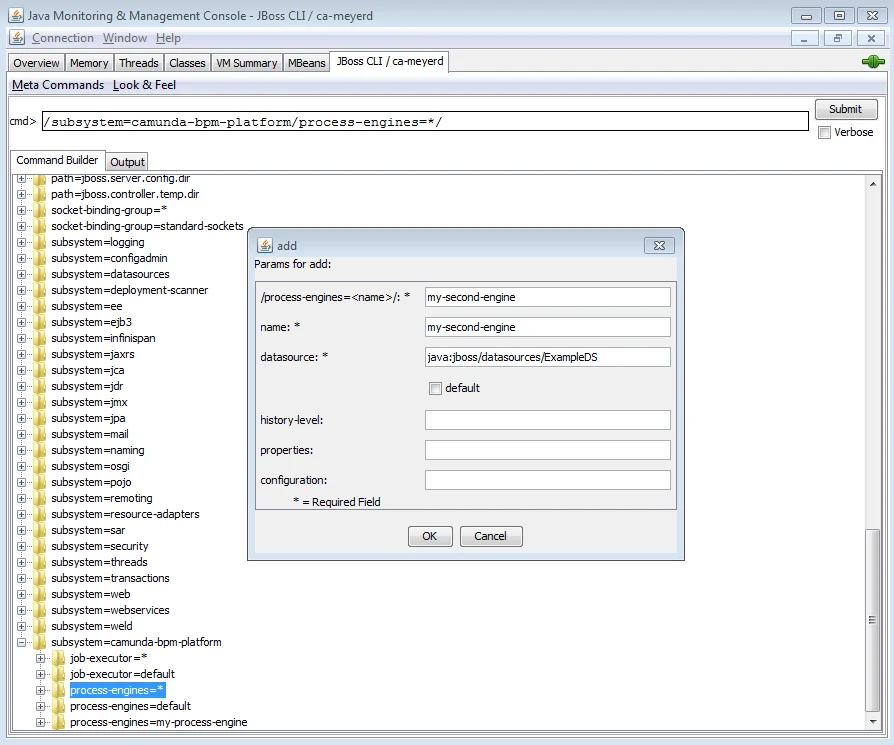 The JConsole plugin allows you to inspect the management model graphically and build operations using a wizard. To start the JBoss JConsole plugin, start the jconsole.bat/sh file provided in the WildFly distribution. [More Information in the WildFly Docs](https://docs.wildfly.org/23/Admin_Guide.html#JMX).
## Manage Classpath Dependencies
**Implicit Module Dependencies**
Classpath dependencies are automatically managed for you if you use the [Process Application API](/user-guide/process-applications).
When using the ASEE Flow Wildfly subsystem, the process engine classes are deployed as WildFly module. The module is named
`org.camunda.bpm.camunda-engine` and is deployed in the folder `$WILDFLY_HOME/modules/org/camunda/bpm/camunda-engine`.
By default, the application server will not add this module to the classpath of applications. If an application needs to interact with the process engine, we must declare a module dependency in the application. This can be achieved using either an implicit or an explicit module dependency.
### Implicit Module Dependencies with the Process Application API
When using the Process Application API (i.e., when deploying either a servlet process application or an EJB process application), the ASEE Flow Wildfly subsystem will detect the `@ProcessApplication` class in the deployment and automatically add a module dependency between the application and the process engine module. As a result, we don't have to declare the dependency ourselves. It is called an [implicit module dependency](https://docs.wildfly.org/23/Developer_Guide.html#Implicit_module_dependencies_for_deployments) because it is not explicitly declared but can be derived by inspecting the application and seeing that it provides a `@ProcessApplication` class.
### Explicit Module Dependencies
If an application does not use the Process Application API but still needs the process engine classes to be added to its classpath, an explicit module dependency is required.
Wildfly offers multiple [different mechanisms for achieving this](https://docs.wildfly.org/23/Developer_Guide.html#Class_Loading_in_WildFly). The simplest way is to add a manifest entry to the MANIFEST.MF file of the deployment. The following example illustrates how to generate such a dependency using the maven WAR plugin:
```xml theme={null}
...
org.apache.maven.plugins
maven-war-plugin
org.camunda.bpm.camunda-engine
```
As a result, the Application Service will add the process engine module to the classpath of the application.
## Manage Service Dependencies
**Implicit Service Dependencies**
Service dependencies are automatically managed for you if you use the [Process Application API](/user-guide/process-applications).
The ASEE Flow Wildfly subsystem manages process engines as JBoss Services in the JBoss Module Service Container. For the Module Service Container to provide the process engine service(s) to the deployed applications, it is important that the dependencies are known. Consider the following example:
The JConsole plugin allows you to inspect the management model graphically and build operations using a wizard. To start the JBoss JConsole plugin, start the jconsole.bat/sh file provided in the WildFly distribution. [More Information in the WildFly Docs](https://docs.wildfly.org/23/Admin_Guide.html#JMX).
## Manage Classpath Dependencies
**Implicit Module Dependencies**
Classpath dependencies are automatically managed for you if you use the [Process Application API](/user-guide/process-applications).
When using the ASEE Flow Wildfly subsystem, the process engine classes are deployed as WildFly module. The module is named
`org.camunda.bpm.camunda-engine` and is deployed in the folder `$WILDFLY_HOME/modules/org/camunda/bpm/camunda-engine`.
By default, the application server will not add this module to the classpath of applications. If an application needs to interact with the process engine, we must declare a module dependency in the application. This can be achieved using either an implicit or an explicit module dependency.
### Implicit Module Dependencies with the Process Application API
When using the Process Application API (i.e., when deploying either a servlet process application or an EJB process application), the ASEE Flow Wildfly subsystem will detect the `@ProcessApplication` class in the deployment and automatically add a module dependency between the application and the process engine module. As a result, we don't have to declare the dependency ourselves. It is called an [implicit module dependency](https://docs.wildfly.org/23/Developer_Guide.html#Implicit_module_dependencies_for_deployments) because it is not explicitly declared but can be derived by inspecting the application and seeing that it provides a `@ProcessApplication` class.
### Explicit Module Dependencies
If an application does not use the Process Application API but still needs the process engine classes to be added to its classpath, an explicit module dependency is required.
Wildfly offers multiple [different mechanisms for achieving this](https://docs.wildfly.org/23/Developer_Guide.html#Class_Loading_in_WildFly). The simplest way is to add a manifest entry to the MANIFEST.MF file of the deployment. The following example illustrates how to generate such a dependency using the maven WAR plugin:
```xml theme={null}
...
org.apache.maven.plugins
maven-war-plugin
org.camunda.bpm.camunda-engine
```
As a result, the Application Service will add the process engine module to the classpath of the application.
## Manage Service Dependencies
**Implicit Service Dependencies**
Service dependencies are automatically managed for you if you use the [Process Application API](/user-guide/process-applications).
The ASEE Flow Wildfly subsystem manages process engines as JBoss Services in the JBoss Module Service Container. For the Module Service Container to provide the process engine service(s) to the deployed applications, it is important that the dependencies are known. Consider the following example:
 There are three applications deployed and two process engine services exist. Application 1 and Application 2 are using Process Engine 1 and Application 3 is using Process Engine 2.
### Implicit Service Dependencies
When using the Process Application API (i.e., when deploying either a servlet process application or an EJB process application), the ASEE Flow Wildfly subsystem will detect the `@ProcessApplication` class in the deployment and automatically add a service dependency between the process application component and the process engine module. This ensures that the process engine is available when the process application is deployed.
### Explicit Service Dependencies
If an application does not use the Process Application API but still needs to interact with a process engine, it is important to declare the dependency on the Process Engine Service explicitly. If we fail to declare the dependency, there is no guarantee that the process engine is available to the application.
* When the application server is started, it will bring up services concurrently.
If it is not aware of the dependency between the application and the process engine, the application may start *before* the process engine, potentially resulting in exceptions if the process engine is accessed from some deployment listener (like a servlet context listener or a @PostConstruct
callback of an Enterprise Bean).
* If the process engine is stopped while the application is deployed, the application server must stop the application as well.
The simplest way to add an explicit dependency on the process engine is to bind the process engine in the application's local naming space. For instance, we can add the following resource reference to the `web.xml` file of a web application:
```xml theme={null}
processEngine/default
org.camunda.bpm.engine.ProcessEngine
java:global/camunda-bpm-platform/process-engine/default
```
This way, the global process engine resource `java:global/camunda-bpm-platform/process-engine/default` is available locally under the name `processEngine/default`. Since the application server is aware of this dependency, it will make sure the Process Engine Service exists before starting the application and it will stop the application if the process engine is removed.
The same effect can be achieved using the `@Resource` Annotation:
```java theme={null}
@Stateless
public class PaComponent {
@Resource(mappedName="java:global/camunda-bpm-platform/process-engine/default")
private ProcessEngine processEngine;
@Produces
public ProcessEngine getProcessEngine() {
return processEngine;
}
}
```
There are three applications deployed and two process engine services exist. Application 1 and Application 2 are using Process Engine 1 and Application 3 is using Process Engine 2.
### Implicit Service Dependencies
When using the Process Application API (i.e., when deploying either a servlet process application or an EJB process application), the ASEE Flow Wildfly subsystem will detect the `@ProcessApplication` class in the deployment and automatically add a service dependency between the process application component and the process engine module. This ensures that the process engine is available when the process application is deployed.
### Explicit Service Dependencies
If an application does not use the Process Application API but still needs to interact with a process engine, it is important to declare the dependency on the Process Engine Service explicitly. If we fail to declare the dependency, there is no guarantee that the process engine is available to the application.
* When the application server is started, it will bring up services concurrently.
If it is not aware of the dependency between the application and the process engine, the application may start *before* the process engine, potentially resulting in exceptions if the process engine is accessed from some deployment listener (like a servlet context listener or a @PostConstruct
callback of an Enterprise Bean).
* If the process engine is stopped while the application is deployed, the application server must stop the application as well.
The simplest way to add an explicit dependency on the process engine is to bind the process engine in the application's local naming space. For instance, we can add the following resource reference to the `web.xml` file of a web application:
```xml theme={null}
processEngine/default
org.camunda.bpm.engine.ProcessEngine
java:global/camunda-bpm-platform/process-engine/default
```
This way, the global process engine resource `java:global/camunda-bpm-platform/process-engine/default` is available locally under the name `processEngine/default`. Since the application server is aware of this dependency, it will make sure the Process Engine Service exists before starting the application and it will stop the application if the process engine is removed.
The same effect can be achieved using the `@Resource` Annotation:
```java theme={null}
@Stateless
public class PaComponent {
@Resource(mappedName="java:global/camunda-bpm-platform/process-engine/default")
private ProcessEngine processEngine;
@Produces
public ProcessEngine getProcessEngine() {
return processEngine;
}
}
```