

Installation GuideIf you download a full distribution from the ASEE Flow customer repository (see Accessing artifacts), the ASEE Flow Wildfly subsystem is readily installed into the application server.Read the installation guide to learn how to install the ASEE Flow Wildfly subsystem into your Wildfly Server.
- Deploy the process engine as shared Wildfly module.
- Configure the process engine in
standalone.xml/domain.xmland administer it though the JBoss Management System. - Process Engines are native JBoss Services with service lifecycles and dependencies.
- Automatic deployment of BPMN 2.0 processes (through the Process Application API).
- Use a managed Thread Pool for the Job Executor configured through the ASEE Flow Subsystem.
Configure the Job Executor in standalone.xml/domain.xml
The configuration of the thread pool used by the Job Executor is done in the ASEE Flow subsystem. The thread pool creation and shutdown is now controlled through the ASEE Flow subsystem.You are able to configure it through the following new configuration elements below the
job-executor element of the subsystem XML configuration.
Mandatory configuration elements are:
<core-threads>3</core-threads><max-threads>5</max-threads><queue-length>10</queue-length>
<keepalive-time>10</keepalive-time>(in seconds)<allow-core-timeout>true</allow-core-timeout>
Configure a Process Engine in standalone.xml/domain.xml
Using the ASEE Flow Wildfly subsystem, it is possible to configure and manage the process engine through the JBoss Management Model. The most straightforward way is to add the process engine configuration to thestandalone.xml file of the Wildfly Server:
java:jboss/datasources/ProcessEngine and is configured to be the default process engine. In addition, the job executor currently uses a single Job Acquisition, also named default.
If you start up your Wildfly server with this configuration, it will automatically create the corresponding services and expose them through the management model.
For a complete list of all configuration options, please refer to the Process Engine Configuration.
Provide a Custom Process Engine Configuration Class
It is possible to provide a custom Process Engine Configuration class on a Wildfly Application Server. To this extent, provide the fully qualified classname of the class in thestandalone.xml file:
org.my.custom.ProcessEngineConfiguration must be a subclass of org.camunda.bpm.engine.impl.cfg.JtaProcessEngineConfiguration.
The properties map can be used for invoking primitive valued setters (Integer, String, Boolean) that follow the Java Bean conventions. In the case of the example above, the
class would provide a method named
Extend a Process Engine Using Process Engine Plugins
It is possible to extend a process engine using the process engine plugins concept. You specify the process engine plugins instandalone.xml/domain.xml for each process engine separately as shown below:
<class> tags. Additional properties can be specified using the <properties> element.
The restrictions which apply for providing a custom process engine configuration class are also valid for process engine plugins:
- Plugin class must be visible in the classpath for the ASEE Flow subsystem.
- Properties map can be used for invoking primitive valued setters (Integer, String, Boolean) that follow the Java Bean conventions.
Using System Properties
To externalize environment specific parts of the configuration, it is possible to reference system properties using Ant-style expressions (i.e.,${PROPERTY_KEY}).
Expression resolution is supported for all elements and attributes except for the name attribute on the elements process-engine and job-acquisition.
System properties may be set via command line (-Doption). Read more on expressions in the documentation for WildFly.
Example
Look Up a Process Engine in JNDI
The ASEE Flow Wildfly subsystem provides the same JNDI bindings for the ProcessApplicationService and the ProcessEngineService as provided on other containers. In addition, the ASEE Flow Wildfly subsystem creates JNDI Bindings for all managed process engines, allowing us to look them up directly. The global JNDI bindings for process engines follow the patternjava:global/camunda-bpm-platform/process-engine/engine1.
Note that when looking up the process engine, using a declarative mechanism (like @Resource or referencing the resource in a deployment descriptor) is preferred over a programmatic way. The declarative mechanism makes the application server aware of our dependency on the Process Engine Service and allows it to manage that dependency for us. See also: Managing Service Dependencies.
A declarative mechanism like @Resource could be
Manage the Process Engine Through the JBoss Management System
To inspect and change the management model, we can use one of the multiple WildFly Management Clients available.Inspect the Configuration
It is possible to inspect the configuration using the CLI (Command Line Interface, jboss-cli.bat/sh):Stop the Process Engine Through the JBoss Management System
Once the process engine is registered in the JBoss Management Model, it is possible to control it through the management API. For example, you can stop it through the CLI:Start the Process Engine Through the JBoss Management System
It is also possible to start a new process engine at runtime:- Persist any changes to the model in the underlying configuration file. This means that if you start a process engine using the command line interface, the configuration will be added to
standalone.xml/domain.xmlsuch that it is available when the server is restarted. - Distribute the configuration in the cluster and start / stop the process engine on all servers that are part of the same domain.
Use the JBoss JConsole Extensions
In some cases, you may find it more convenient to use WildFly’s JConsole extension for starting a process engine.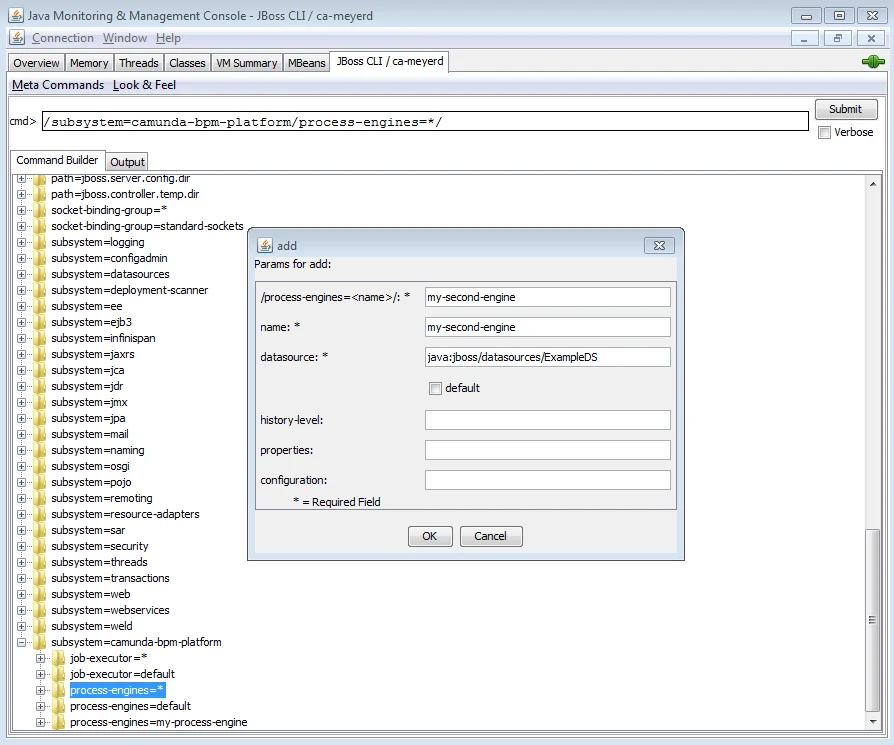
Manage Classpath Dependencies
Implicit Module DependenciesClasspath dependencies are automatically managed for you if you use the Process Application API.
org.camunda.bpm.camunda-engine and is deployed in the folder $WILDFLY_HOME/modules/org/camunda/bpm/camunda-engine.
By default, the application server will not add this module to the classpath of applications. If an application needs to interact with the process engine, we must declare a module dependency in the application. This can be achieved using either an implicit or an explicit module dependency.
Implicit Module Dependencies with the Process Application API
When using the Process Application API (i.e., when deploying either a servlet process application or an EJB process application), the ASEE Flow Wildfly subsystem will detect the@ProcessApplication class in the deployment and automatically add a module dependency between the application and the process engine module. As a result, we don’t have to declare the dependency ourselves. It is called an implicit module dependency because it is not explicitly declared but can be derived by inspecting the application and seeing that it provides a @ProcessApplication class.
Explicit Module Dependencies
If an application does not use the Process Application API but still needs the process engine classes to be added to its classpath, an explicit module dependency is required. Wildfly offers multiple different mechanisms for achieving this. The simplest way is to add a manifest entry to the MANIFEST.MF file of the deployment. The following example illustrates how to generate such a dependency using the maven WAR plugin:Manage Service Dependencies
Implicit Service DependenciesService dependencies are automatically managed for you if you use the Process Application API.

Implicit Service Dependencies
When using the Process Application API (i.e., when deploying either a servlet process application or an EJB process application), the ASEE Flow Wildfly subsystem will detect the@ProcessApplication class in the deployment and automatically add a service dependency between the process application component and the process engine module. This ensures that the process engine is available when the process application is deployed.
Explicit Service Dependencies
If an application does not use the Process Application API but still needs to interact with a process engine, it is important to declare the dependency on the Process Engine Service explicitly. If we fail to declare the dependency, there is no guarantee that the process engine is available to the application.- When the application server is started, it will bring up services concurrently. If it is not aware of the dependency between the application and the process engine, the application may start before the process engine, potentially resulting in exceptions if the process engine is accessed from some deployment listener (like a servlet context listener or a @PostConstruct callback of an Enterprise Bean).
- If the process engine is stopped while the application is deployed, the application server must stop the application as well.
web.xml file of a web application:
java:global/camunda-bpm-platform/process-engine/default is available locally under the name processEngine/default. Since the application server is aware of this dependency, it will make sure the Process Engine Service exists before starting the application and it will stop the application if the process engine is removed.
The same effect can be achieved using the @Resource Annotation: