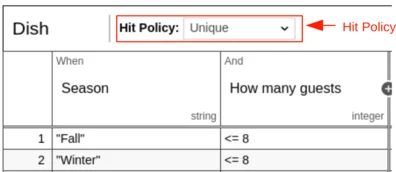
hitPolicy attribute on the decisionTable XML
element. If no hit policy is set, then the default hit policy UNIQUE is used.
| Hit Policy | XML representation |
|---|---|
| Unique | UNIQUE |
| Any | ANY |
| First | FIRST |
| Rule order | RULE ORDER |
| Collect | COLLECT |
The Role of a Hit Policy
A hit policy specifies how many rules of a decision table can be satisfied and which of the satisfied rules are included in the decision table result. The hit policies Unique, Any and First will always return a maximum of one satisfied rule. The hit policies Rule Order and Collect can return multiple satisfied rules.Unique Hit Policy
Only a single rule can be satisfied or no rule at all. The decision table result contains the output entries of the satisfied rule. If more than one rule is satisfied, the Unique hit policy is violated. See the following decision table.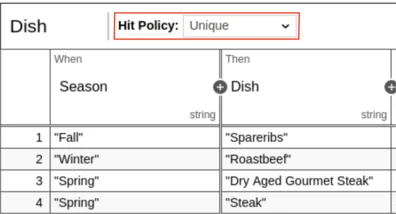
Any Hit Policy
Multiple rules can be satisfied. However, all satisfied rules must generate the same output. The decision table result contains only the output of one of the satisfied rules. If multiple rules are satisfied which generate different outputs, the hit policy is violated. See the following example: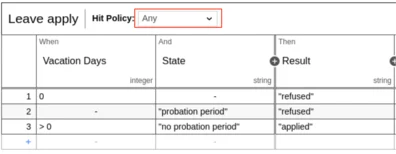
First Hit Policy
Multiple rules can be satisfied. The decision table result contains only the output of the first satisfied rule.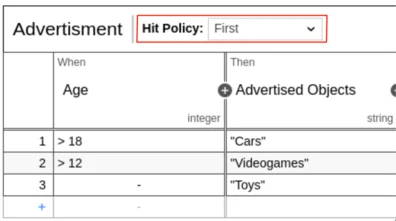
Rule Order Hit Policy
Multiple rules can be satisfied. The decision table result contains the output of all satisfied rules in the order of the rules in the decision table.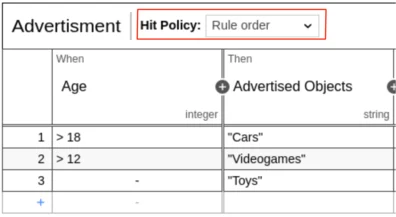
Collect Hit Policy
Multiple rules can be satisfied. The decision table result contains the output of all satisfied rules in an arbitrary order as a list.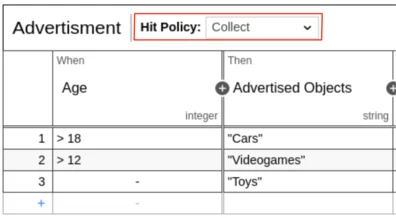
aggregation attribute of the decisionTable
XML element.
Aggregators for Collect Hit Policy
In the visual representation of the decision table an aggregator can be selected in addition to theCOLLECT hit policy. The following aggregators are supported by
the ASEE Flow DMN engine:
| Visual representation | XML representation | Result of the aggregation |
|---|---|---|
| Collect (Sum) | SUM | the sum of all output values |
| Collect (Min) | MIN | the smallest value of all output values |
| Collect (Max) | MAX | the largest value of all output values |
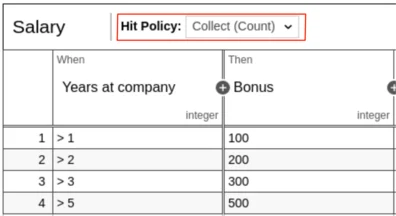
| Collect (Count) | COUNT | the number of output values |
SUM aggregator
The SUM aggregator sums up all outputs from the satisfied rules.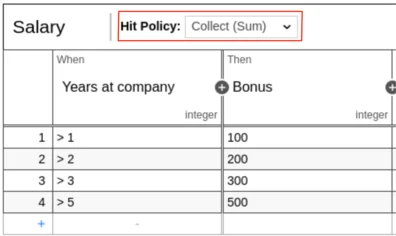
MIN aggregator
The MIN aggregator can be used to return the smallest output value of all satisfied rules. See the following example of a car insurance. After years without a car crash the insurance fee will be reduced.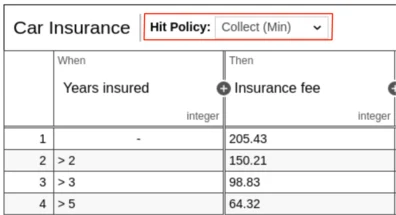
MAX aggregator
The MAX aggregator can be used to return the largest output value of all satisfied rules.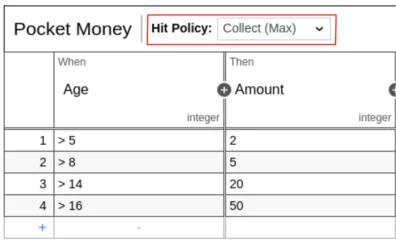
COUNT aggregator
The COUNT aggregator can be use to return the count of satisfied rules.