

Parse Decisions
Decisions can be parsed from anInputStream or transformed from a DmnModelInstance.
This example shows how to parse a decision from an input stream:
The Decision Key
A DMN XML file can contain multiple decisions - grouped by the decision requirements graph. To distinguish the decisions, every decision must have anid attribute.
id of a decision in the XML is called key in the context of the DMN
engine. To only parse a specific decision from a DMN file, you specify the decision
key which corresponds to the id attribute in the XML file.
Parse Decision Requirements Graph
In addition to parsing all contained decisions of a decision requirements graph (DRG), the DMN engine can also parse the DRG itself from anInputStream or a DmnModelInstance.
definitions element. The id of the DRG in the XML is called key in the context of the DMN engine.
Decision Tables only
It is possible to check if a parsed decision is implemented as decision table by using the method isDecisionTable().Evaluate Decisions
To evaluate (or “execute”) a decision, either pass an already transformed DmnDecision or use a DMN model instance or input stream in combination with a decision key. As input to the evaluation, a set of input variables must be provided.Pass Variables
To provide the input variables for a decision evaluation you can use a JavaMap<String, Object>, resp. a VariableMap or a VariableContext.
The following example shows how to use a VariableMap.
VariableContext can be used.
Use the VariableContext to support lazy-loading of variables.
Interpret the Decision Result
The evaluation of a DMN decision returns a DmnDecisionResult. If the decision is implemented as decision table then the result is a list of the matching decision rule results. These results represent a mapping from an output name to an output value. If the decision is instead implemented as decision literal expression then the result is a list which contains only one entry. This entry represents the expression value and is mapped to the variable name. Assume the following example of making a decision to select a dish.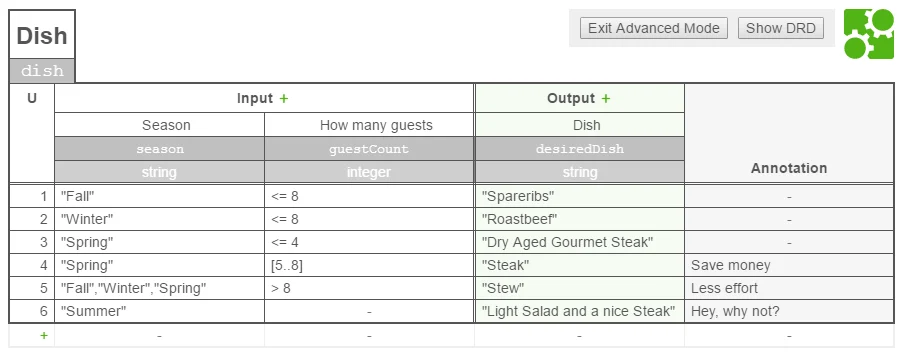
desiredDish as the output.
Assume that the decision table is executed with the following input variables:
season: “Spring”guestCount: 14
DmnDecisionResult thus consists of one DmnDecisionResultEntries which contains the key desiredDish.
To access the output value, get() method of DmnDecisionResultEntries is used:
DmnDecisionResult.
Decisions with Required Decisions
If a decision has one or more required decisions, then the required decisions are evaluated first. The results of this evaluations are passed as input for the evaluation of the decision. Assume the following example of making a decision to select beverages.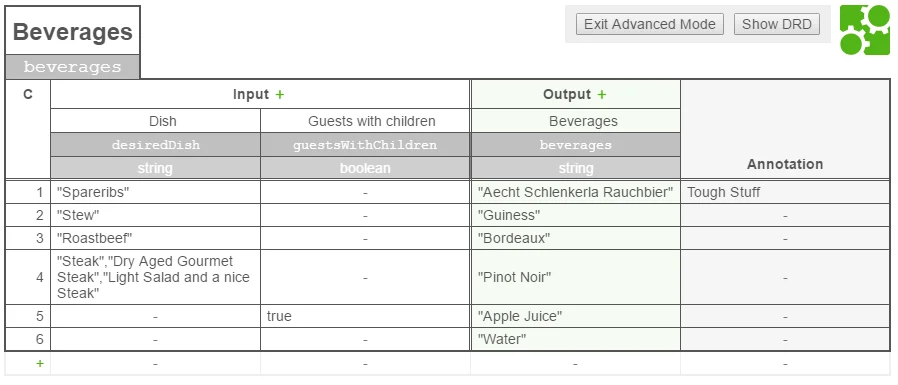
Beverages decision requires the Dish decision (from the previous example).
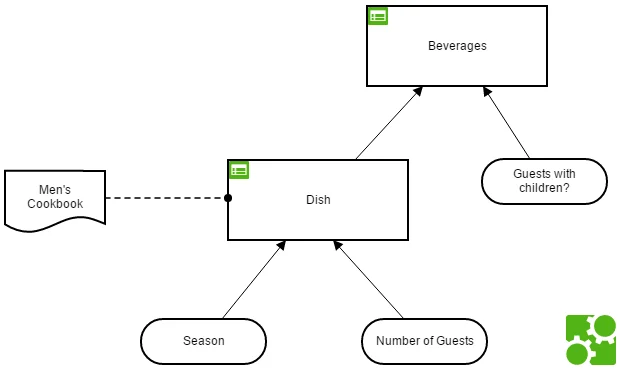
Beverages decision is evaluated then the DMN engine evaluates the Dish decision first.
Assume that the decision is evaluated with the following input variables:
season: “Spring”guestCount: 14guestsWithChildren: false
Dish decision table has one matching rule and generates the output value Stew that is mapped to the output variable desiredDish.
The output result of the Dish decision is used as input of the Beverages decision. That means that the input expression desiredDish of the Beverages decision returns the output value Stew of the Dish decision. In general, a decision can access the results (i.e., the output values) of required decisions by there output name.
As result, the Beverages decision has two matching rules and generates the output values Guiness and Water.