Adding JSF Forms to your Process Application
Heads-up!The required CDI beans for this functionality are currently not available in Quarkus applications out of the box.
external task forms. A working example can be found in the examples repository. The BPMN process used for this example is shown in the image below:
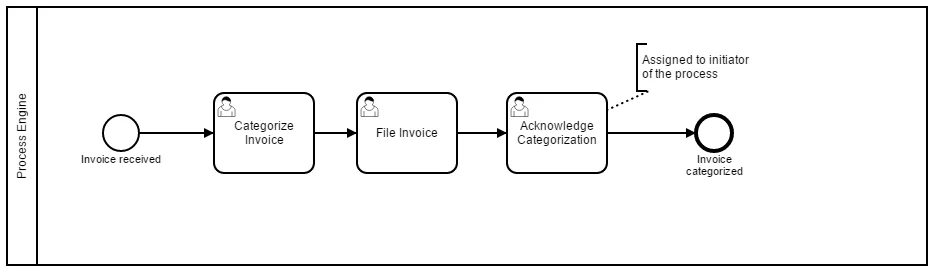
- the Start Event “invoice received”. This is the form the user has to complete to start a new process instance.
- the User Tasks. These are the forms the user has to complete when completing user tasks that are assigned to him.
camunda:formKey attribute:
Creating Simple User Task Forms
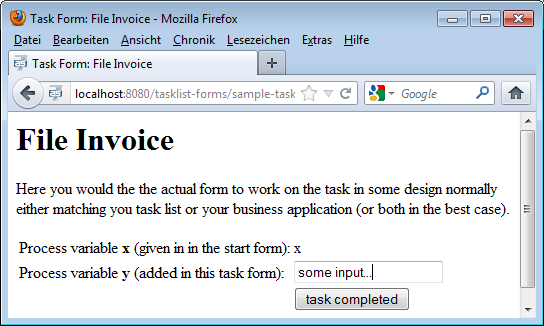
Create a JSF page insrc/main/webapp/WEB-INF representing a form used for User Tasks. A very simple task form is shown below:
camunda-engine-cdi in order to have the camundaTaskForm bean available.
How does this work?
If the user clicks on “Start to work on task” in the tasklist, he will follow a link to this form, including the taskId and the callback URL (the URL to access the central tasklist) as GET-Parameters. Accessing this form will trigger the special CDI bean
 camundaTaskForm which
- starts a conversation,
- remembers the callback URL
- starts the User Task in the process engine, meaning the bean sets the start date and assigns the task to the CDI business process scope (see CDI Integration for details).
camundaTaskForm bean again, which:
- Completes the task in the process engine, causing the current token to advance in the process
- Ends the conversation
- Triggers a redirect to the callback URL of the tasklist
completeTask button. This will work because of the conversation running in the background.
Access Process Variables
In the forms you can access your own CDI beans as usual and also access the ASEE Flow CDI beans. This makes it easy to access process variables, e.g., via theprocessVariables CDI bean:
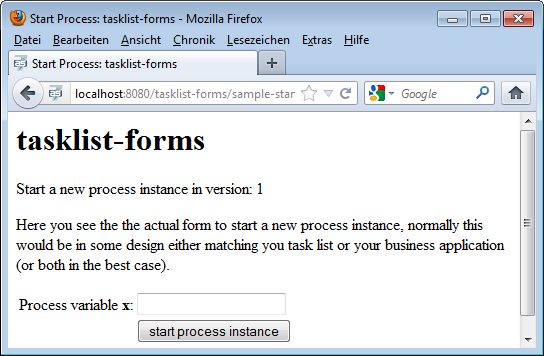
 in the tasklist and chooses the process your start form is assigned to, he will follow a link to this form, including the processDefinitionKey and the callback URL (the URL to access the central tasklist) as GET-Parameters. Accessing this form will trigger the special CDI bean
 camundaTaskForm which:
- Starts a conversation
- Remembers the callback URL to the centralized tasklist
- Starts the process instance in the process engine
- Ends the conversation
- Triggers a redirect to the callback URL of the tasklist
completeProcessInstanceForm button. This will work because of the conversation running in the background.
Styling your Task Forms
We use Twitter Bootstrap in our tasklist - so best add this to your Process Application as well and you can easily polish your UI: