

Services API
The Java API is the most common way of interacting with the engine. The central starting point is the ProcessEngine, which can be created in several ways as described in the configuration section. From the ProcessEngine, you can obtain the various services that contain the workflow/BPM methods. ProcessEngine and the services objects are thread safe. So you can keep a reference to 1 of those for a whole server.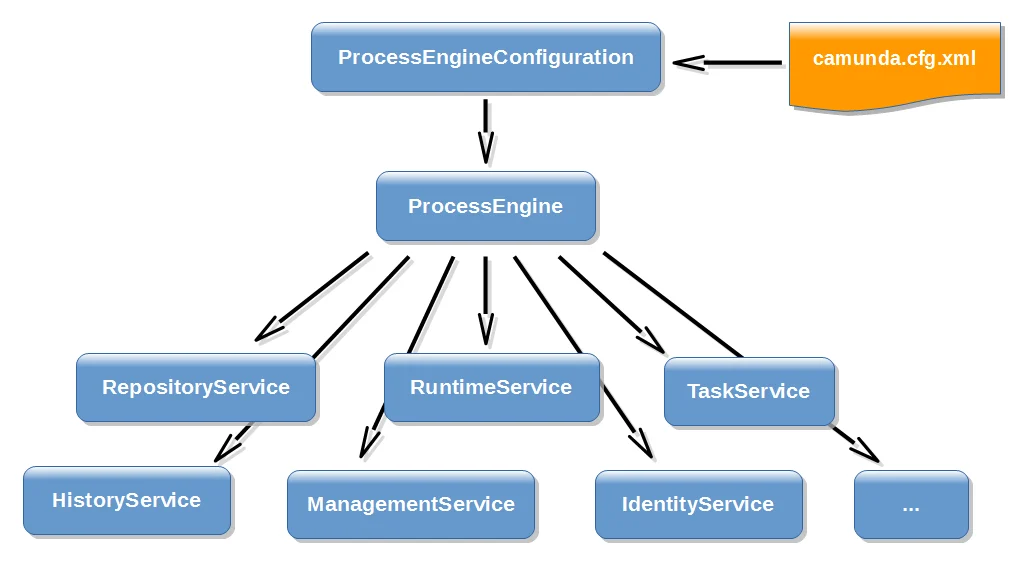
ProcessEngines.getDefaultProcessEngine() will initialize and build a process engine the first time it is called and afterwards always returns the same process engine. Proper creation and closing of all process engines can be done with ProcessEngines.init() and ProcessEngines.destroy().
The ProcessEngines class will scan for all camunda.cfg.xml and activiti.cfg.xml files. For all camunda.cfg.xml files, the process engine will be built in the typical way:
activiti.cfg.xml files, the process engine will be built in the Spring way: first the Spring application context is created and then the process engine is obtained from that application context.
All services are stateless. This means that you can easily run ASEE Flow on multiple nodes in a cluster, each going to the same database, without having to worry about which machine actually executed previous calls. Any call to any service is idempotent regardless of where it is executed.
The RepositoryService is probably the first service needed when working with the ASEE Flow engine. This service offers operations for managing and manipulating deployments and process definitions. Without going into much detail here, a process definition is the Java counterpart of a BPMN 2.0 process. It is a representation of the structure and behavior of each of the steps of a process. A deployment is the unit of packaging within the engine. A deployment can contain multiple BPMN 2.0 XML files and any other resource. The choice of what is included in one deployment is up to the developer. It can range from a single process BPMN 2.0 XML file to a whole package of processes and relevant resources (for example the deployment ‘hr-processes’ could contain everything related to hr processes). The RepositoryService allows to deploy such packages. Deploying a deployment means it is uploaded to the engine, where all processes are inspected and parsed before being stored in the database. From that point on, the deployment is known to the system and any process included in the deployment can now be started.
Furthermore, this service allows to
- Query on deployments and process definitions known to the engine.
- Suspend and activate process definitions. Suspending means no further operations can be done on them, while activation is the opposite operation.
- Retrieve various resources such as files contained within the deployment or process diagrams that were automatically generated by the engine.
- Querying tasks assigned to users or groups.
- Creating new standalone tasks. These are tasks that are not related to a process instances.
- Manipulating to which user a task is assigned or which users are in some way involved with the task.
- Claiming and completing a task. Claiming means that someone decided to be the assignee for the task, meaning that this user will complete the task. Completing means ‘doing the work of the tasks’. Typically this is filling in a form of sorts.
Query API
To query data from the engine there are multiple possibilities:- Java Query API: Fluent Java API to query engine entities (like ProcessInstances, Tasks, …).
- REST Query API: REST API to query engine entities (like ProcessInstances, Tasks, …).
- Native Queries: Provide own SQL queries to retrieve engine entities (like ProcessInstances, Tasks, …) if the Query API lacks the possibilities you need (e.g., OR conditions).
- Custom Queries: Use completely customized queries and an own MyBatis mapping to retrieve own value objects or join engine with domain data.
- SQL Queries: Use database SQL queries for use cases like Reporting.
Query Maximum Results Limit
Querying for results without restricting the maximum number of results or querying for a vast number of results can lead to a high memory consumption or even to out of memory exceptions. With the help of the Query Maximum Results Limit, you can restrict the maximum number of results. This restriction is only enforced in the following cases:- an authenticated user performs the query
- the query API is directly called e. g. via REST API (no enforcement within a process through Delegation Code)
Forbidden
- Performing a query with an unbounded number of results using the
#list()method - Performing a Paginated Query that exceeds the configured limit of maximum results
- Performing a query-based synchronous operation that affects more instances than the limit of maximum results (please use a Batch Operation instead)
Allowed
- Performing a query using the
Query#unlimitedListmethod - Performing a Paginated Query with a maximum number of results less or equal to the maximum results limit
- Performing a Native Query since it is not accessible via REST API or Webapps and therefore not likely to be exploited
Limitations
- Performing a statistics query via REST API
- Performing a called instance query via Webapps (private API)
Custom Identity Service Queries
When you provide…- a custom identity provider implementation by implementing the interface
ReadOnlyIdentityProviderorWritableIdentityProvider - AND a dedicated implementation of Identity Service Queries (e. g.
GroupQuery,TenantQuery,UserQuery)
Query#unlimitedList.
The possibility to retrieve an unlimited list is important to make sure that the REST API works appropriately since a few endpoints
rely on retrieving unlimited results.
Paginated Queries
Pagination allows configuring the maximum results retrieved by a query as well as the position (index) of the first result. Please see the following example:OR Queries
The default behavior of the query API links filter criteria together with an AND expression. OR queries enable building queries in which filter criteria are linked together with an OR expression.Heads-up!
- This functionality is only available for task and process instance queries (runtime & history).
- The following methods cannot be applied to an OR query: orderBy…(), initializeFormKeys(), withCandidateGroups(), withoutCandidateGroups(), withCandidateUsers(), withoutCandidateUsers(), incidentIdIn().
or(), a chain of several filter criteria could follow. Each filter criterion is linked together
with an OR expression. The invocation of endOr() marks the end of the OR query. Calling these two methods is comparable
to putting the filter criteria in brackets.
assignee = "John Munda" AND (name = "Approve Invoice" OR priority = 5), Conjunctive Normal Form).
Internally the query is translated to the following SQL query (slightly simplified):
Heads-up!In the query shown above the value “sales” of the filter criterion
taskCandidateGroup is replaced by the value
“controlling”. To avoid this behavior, filter criteria with a trailing …In could be used e.g.,:- taskCandidateGroupIn()
- tenantIdIn()
- processDefinitionKeyIn()