

Single Process Engine With Tenant-Identifiers
Multi-Tenancy can be achieved with one process engine which uses tenant identifiers (i.e., tenant-ids). The data of all tenants is stored in one table (same database and schema). Isolation is provided by the means of a tenant identifier that is stored in a column.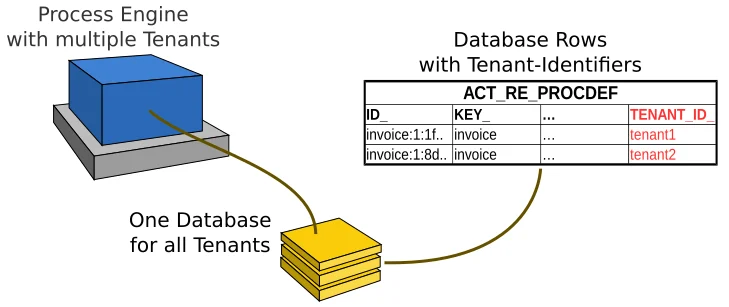
ExamplesFind examples on GitHub that show how to use tenant-identifiers with
Deploy Definitions for a Tenant
To deploy definitions for a single tenant, the tenant identifier has to be set on the deployment. The given identifier is propagated to all definitions of the deployment so that they belong to the tenant. If no tenant identifier is set then the deployment and its definitions belong to all tenants. In this case, all tenants can access the deployment and the definitions. See this section to read more about how to use shared definitions.Specify the Tenant Identifier via Java API
When a deployment is created using the Repository Service, the tenant identifier can be set on the DeploymentBuilder.Specify the Tenant Identifier via Deployment Descriptor
In case of a process application, the deployment is specified by a processes.xml Deployment Descriptor. Since the descriptor can contain multiple process-archives (i.e., deployments), the tenant identifier can be set on each process-archive astenantId attribute.
Specify the Tenant Identifier via Spring Configuration
When the Automatic Resource Deployment of the Spring Framework Integration is used, the tenant identifier can be specified in the Process Engine Configuration asdeploymentTenantId property.
Versioning of Tenant-Specific Definitions
When a definition is deployed for a tenant then it is assigned a version which is independent from definitions of other tenants. For example, if a new process definition is deployed for two tenants then both definitions are assigned the version1. The versioning within one tenant works like the versioning of definitions that belong to no tenant.
Query Data of a Tenant
The process engine queries of tenant-specific data (e.g., Deployment Query, Process Definition Query) allows to filter by one or more tenant identifiers. If no identifier is set then the result contains the data of all tenants. Note that the transparent access restrictions of tenants can influence the result of a query if a user is not allowed to see the data of a tenant.Query Deployments of a Tenant
To find the deployments of specific tenants, the tenant identifiers have to be passed totenantIdIn on the DeploymentQuery.
withoutTenantId().
includeDeploymentsWithoutTenantId().
Query Definitions of a Tenant
Similar to theDeploymentQuery, the definition queries allow to filter by one or more tenants and by definitions which belong to no tenant.
Run Commands for a Tenant
When a definition is deployed for multiple tenants, a command can be ambiguous (e.g., start a process instance by key). If such a command is executed, aProcessEngineException is thrown. To run the command successfully, the tenant identifier has to be passed to the command.
Note that the transparent access restrictions of tenants can omit the tenant identifier if a user is only allowed to see one of the definitions.
Create a Process Instance
To create an instance by key of a process definition which is deployed for multiple tenants, the tenant identifier has to be passed to the ProcessInstantiationBuilder.Correlate a Message
The Message API can be used to correlate a message to one or all tenants. In case a message can correlate to definitions or executions of multiple tenants, the tenant identifier has to be passed to the MessageCorrelationBuilder. Otherwise, aMismatchingMessageCorrelationException is thrown.
correlateAll().
Send a Signal
The Signal API can be used to deliver a signal to one or all tenants. Pass the tenant identifier to the SignalEventReceivedBuilder to deliver the signal to a specific tenant. If no identifier is passed then the signal is delivered to all tenants.Create a Case Instance
To create an instance by key of a case definition which is deployed for multiple tenants, the tenant identifier has to be passed to the CaseInstanceBuilder.Evaluate a Decision Table
To evaluate a decision table by key which is deployed for multiple tenants, the tenant identifier has to be passed to the DecisionEvaluationBuilder.Transparent Access Restrictions for Tenants
When integrating ASEE Flow into an application, it can be cumbersome to pass the tenant Id to each camunda API call. Since such an application usually also has a concept of an “authenticated user”, it is possible to set the list of tenant ids when setting the authentication:setAuthentication(...) and clearAuthentication() are transparently executed with the list
of provided tenant Ids.
Query Example
The following queryTask Access Example
For other commands likecomplete(), the transparent access check ensures that the authenticated user does not access
resources by other tenants:
Getting a user’s Tenant Ids from the Identity Service
The process engine’s Identity Service can be used to manage users, groups and tenants as well as their relationships. The following example shows how to retrieve the lists of groups and tenants for a given user and then use these lists when setting the authentication:LDAP Identity ServiceThe above example only works with the Database Identity Service (i.e., the default implementation). The LDAP Identity Service doesn’t support tenants.
ASEE Flow Rest API and Web Applications
The ASEE Flow Rest API and the web applications Cockpit and Tasklist support the transparent access restrictions. When a user logs in then he only sees and can only access the data (e.g., process definitions) that belongs to one of his tenants. Tenants and their memberships can be managed in the Admin web application.Disable the Transparent Access Restrictions
The transparent access restrictions are enabled by default. To disable the restrictions, set thetenantCheckEnabled property in the ProcessEngineConfiguration to false.
Additionally, it is also possible to disable the restrictions for a single command (e.g., for a maintenance task). Use the CommandContext to disable and enable the restrictions for the current command.
ProcessEngineConfiguration.
Access all Tenants as Administrator
The admin user or users who are a member of the admin group can access the data of all tenants, even if they don’t belong to the tenants. This is useful for an administrator of a multi-tenancy application as they must manage the data of all tenants. Define admin users by making them a member of the groupcamunda-admin or with the help of the Admin Authorization Plugin. The Admin Authorization Plugin allows granting admin privileges to a custom user or group.
Shared Definitions for all Tenants
In section Deploy Definitions for a Tenant it is explained how to deploy a Process Definition or a Decision Definition for a particular tenant. The result is that the definition is only visible to the tenant for whom it was deployed but not to other tenants. This is useful if tenants have different processes and decisions. However, there are also many situations where all tenants should share the same definitions. In such situations it is desirable to deploy a definition only once, in a way that it is visible to all tenants. Then, when a new instance is created by a particular tenant, it should be only visible to that tenant (and administrators of course). This can be achieved by a usage pattern we call “Shared Definitions”. By the term usage pattern we mean that it is not a feature of ASEE Flow per se but rather a specific way to use it to achieve the desired behavior.Deploy a Shared Definition
Deploying a shared definition is just a “regular” deployment not assigning a Tenant Id to the deployment:Include Shared Definitions in a Query
Often in an application, we want to present a list of “available” process definitions to the user. In a multi tenancy context with shared resources we want the list to include definitions with the following properties:- tenant id is the current user’s tenant id,
- tenant id is
null=> process is a shared resource.
tenantIdIn(...)) and include definitions without a tenant id (includeProcessDefinitionsWithoutTenantId()). Or, looking at it the other way around: exclude all definitions which have a tenant id which is different from the current user’s tenant id(s).
Example:
Instantiate a Shared Definition
When creating (starting) a new process instance, the tenant id of the process definition is propagated to the process instance. Shared resources do not have a tenant id which means that no tenant id is propagated automatically. To have the tenant id of the user who starts the process instances assigned to the process instance, an implementation of the TenantIdProvider SPI needs to be provided. TheTenantIdProvider receives a callback when an instance of a process definition, case definition or decision definition is created. It can then assign a tenant id to the newly created instance (or not).
The following example shows how to assign a tenant id to an instance based on the current authentication:
TenantIdProvider, it must be set in the Process Engine Configuration, for example using the camunda.cfg.xml:
Tenant-specific behavior with Call Activities
So far, we have seen that shared resources are a useful pattern if tenants have the same process definition. The advantage is that we do not have to deploy the same process definitions once per tenant. Yet, in many real world applications, the situation is somewhat in between: tenants share mostly the same process definitions, but there are some tenant specific variations. A common pattern of how to deal with this is to extract the tenant-specific behavior in a separate process which is then invoked using a call activity. Tenant specific decision logic (i.e., decision tables) using a business rules task are also common. To realize this, the call activity or business rule task needs to select the correct definition to invoke based on the tenant id of the current process instance. The Shared Resources Example shows how to achieve this. See also:- Shared Resources Example
- Called Element Tenant Id
- Case Tenant Id for call activities.
- Decision Ref Tenant Id for business rule tasks.
One Process Engine Per Tenant
Multi-Tenancy can be achieved by providing one process engine per tenant. Each process engine is configured to use a different data source which connects the data of the tenant. The data of the tenants can be stored in different databases, in one database with different schemas or in one schema with different tables.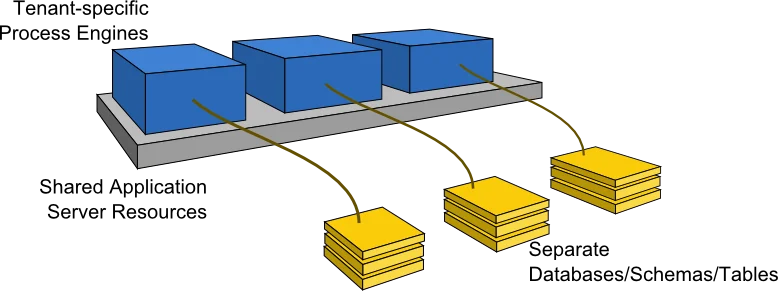
TutorialYou can see the example how to implement multi-tenancy with data isolation by schemas.
Configure the Process Engines
The process engines can be configured in a configuration file or via Java API. Each engine should have a name that is related to a tenant such that it can be identified based on the tenant. For example, each engine can be named after the tenant it serves. See the Process Engine Bootstrapping section for details.Database Isolation
If different tenants should work on entirely different databases, they have to use different JDBC settings or different data sources.Schema or Table Isolation
For schema- or table-based isolation, a single data source can be used which means that resources like a connection pool can be shared among multiple engines. To achieve this,- the configuration option databaseTablePrefix can be used to configure database access.
- consider switching on the setting
useSharedSqlSessionFactory. The setting controls whether each process engine instance should parse and maintain a local copy of the mybatis mapping files or whether a single, shared copy can be used. Since the mappings require a lot of heap (>30MB), it is recommended to switch this on. This way only one copy needs to be allocated.
Job Executor for Multiple Process Engines
For background execution of processes and tasks, the process engine has a component called job executor. The job executor periodically acquires jobs from the database and submits them to a thread pool for execution. For all process applications on one server, one thread pool is used for job execution. Furthermore, it is possible to share the acquisition thread between multiple engines. This way, resources are still manageable even when a large amount of process engines are used. See the section The Job Executor and Multiple Process Engines for details.Example Configuration for Schema Isolation
Multi-Tenancy settings can be applied in the various ways of configuring a process engine. The following is an example of a bpm-platform.xml file that specifies engines for two tenants that share the same database but work on different schemas:Deploy Definitions for a Tenant
When developing process applications, i.e., process definitions and supplementary code, some processes may be deployed to every tenant’s engine while others are tenant-specific. The processes.xml deployment descriptor that is part of every process application offers this kind of flexibility by the concept of process archives. One application can contain any number of process archive deployments, each of which can be deployed to a different process engine with different resources. See the section on the processes.xml deployment descriptor for details. The following is an example that deploys different process definitions for two tenants. It uses the configuration propertyresourceRootPath that specifies a path in the deployment that contains process definitions to deploy. Accordingly, all the processes under processes/tenant1 on the application’s classpath are deployed to engine tenant1, while all the processes under processes/tenant2 are deployed to engine tenant2.
Access the Process Engine of a Tenant
To access a specific tenant’s process engine at runtime, it has to be identified by its name. The ASEE Flow engine offers access to named engines in various programming models:- Plain Java API: Via the ProcessEngineService any named engine can be accessed.
- CDI Integration: Named engine beans can be injected out of the box. The built-in CDI bean producer can be specialized to access the engine of the current tenant dynamically.
- Via JNDI on Wildfly: On Wildfly, every container-managed process engine can be looked up via JNDI.