

Process Definitions
A process definition defines the structure of a process. You could say that the process definition is the process. ASEE Flow uses BPMN 2.0 as its primary modeling language for modeling process definitions.BPMN 2.0 ReferenceASEE Flow comes with two BPMN 2.0 References:
- The BPMN 2.0 Modeling Reference introduces the fundamentals of BPMN 2.0 and helps you to get started modeling processes. (Make sure to read the Tutorial as well.)
- The BPMN 2.0 Implementation Reference covers the implementation of the individual BPMN 2.0 constructs in ASEE Flow. You should consult this reference if you want to implement and execute BPMN processes.
Query for Process Definitions
You can query for all deployed process definitions using the Java API and theProcessDefinitionQuery made available through the RepositoryService. Example:
invoice ordered by their version property.
You can also query for process definitions using the REST API.
Keys and Versions
The key of a process definition (invoice in the example above) is the logical identifier of the process. It is used throughout the API, most prominently for starting process instances (see section on process instances). The key of a process definition is defined using the id property of the corresponding <process ... > element in the BPMN 2.0 XML file:
Suspend Process Definitions
Suspending a process definition disables it temporarily, i.e., it cannot be instantiated while it is suspended. TheRuntimeService Java API can be used to suspend a process definition. Similarly, you can activate a process definition to undo this effect.
Process Instances
A process instance is an individual execution of a process definition. The relation of the process instance to the process definition is the same as the relation between Object and Class in Object Oriented Programming (the process instance playing the role of the object and the process definition playing the role of the class in this analogy). The process engine is responsible for creating process instances and managing their state. If you start a process instance which contains a wait state, for example a user task, the process engine must make sure that the state of the process instance is captured and stored inside a database until the wait state is left (the user task is completed).Start a Process Instance
The simplest way to start a process instance is by using thestartProcessInstanceByKey(...) method offered by the RuntimeService:
Start Process Instances via Tasklist
In case you use Tasklist to start process instances, thestartableInTasklist option
exists to specify which processes are visible for being started by the user.
For instance, this could be sensible for a subprocess: if it should only be possible to start the super process but not
the subprocess, adjust the process xml file (*.bpmn) as follows:
Start a Process Instance at Any Set of Activities
ThestartProcessInstanceByKey and startProcessInstanceById methods start the process instance at their default initial activity, which is typically the single blank start event of the process definition. It is also possible to start anywhere in a process instance by using the fluent builder for process instances. The fluent builder can be accessed via the RuntimeService methods createProcessInstanceByKey and createProcessInstanceById.
The following starts a process instance before the activity SendInvoiceReceiptTask and the embedded sub process DeliverPizzaSubProcess:
execute, the process engine performs these instructions in the order they are specified. In the above example, the engine first starts the task SendInvoiceReceiptTask and executes the process until it reaches a wait state and then starts DeliverPizzaTask and does the same. After these two instructions, the execute call returns.
Variables in Return
To access the latest variables which was used by the process instance during execution theexecuteWithVariablesInReturn can be used, instead of the execute method.
See the following example:
executeWithVariablesInReturn returns if the process instance ends or reaches a wait state. The returned ProcessInstanceWithVariables object contains the informations of the process instance and the latest variables.
Query for Process Instances
You can query for all currently running process instances using theProcessInstanceQuery offered by the RuntimeService:
invoice process where the creditor is Nice Pizza Inc..
You can also query for process instances using the REST API.
Interact With a Process Instance
Once you have performed a query for a particular process instance (or a list of process instances), you may want to interact with it. There are multiple possibilities to interact with a process instance, most prominently:- Triggering it (make it continue execution):
- Through a Message Event
- Through a Signal Event
- Canceling it:
- Using the
RuntimeService.deleteProcessInstance(...)method.
- Using the
- Starting/Canceling any activity:
- Using the process instance modification feature
Suspend Process Instances
Suspending a process instance is helpful, if you want ensure that it is not executed any further. For example, if process variables are in an undesired state, you can suspend the instance and change the variables safely. In detail, suspension means to disallow all actions that change token state (i.e., the activities that are currently executed) of the instance. For example, it is not possible to signal an event or complete a user task for a suspended process instance, as these actions will continue the process instance execution subsequently. Nevertheless, actions like setting or removing variables are still allowed, as they do not change the token state. Also, when suspending a process instance, all tasks belonging to it will be suspended. Therefore, it will no longer be possible to invoke actions that have effects on the task’s lifecycle (i.e., user assignment, task delegation, task completion, …). However, any actions not touching the lifecycle like setting variables or adding comments will still be allowed. A process instance can be suspended by using thesuspendProcessInstanceById(...) method of the RuntimeService. Similarly it can be reactivated again.
If you would like to suspend all process instances of a given process definition, you can use the method suspendProcessDefinitionById(...) of theRepositoryService and specify the suspendProcessInstances option.
Executions
If your process instance contains multiple execution paths (like for instance after a parallel gateway, you must be able to differentiate the currently active paths inside the process instance. In the following example, two user tasks receive payment and ship order can be active at the same time.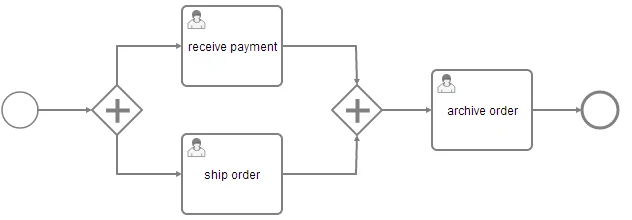
Query for Executions
You can query for executions using theExecutionQuery offered by the RuntimeService:
Activity Instances
The activity instance concept is similar to the execution concept but takes a different perspective. While an execution can be imagined as a token moving through the process, an activity instance represents an individual instance of an activity (task, subprocess, …). The concept of the activity instance is thus more state-oriented. Activity instances also span a tree, following the scope structure provided by BPMN 2.0. Activities that are “on the same level of subprocess” (i.e., part of the same scope, contained in the same subprocess) will have their activity instances at the same level in the tree. For example, Activity Instances are used for Process Instance Modification and the Activity Instance Tree in Cockpit. Examples:- Process with two parallel user tasks after parallel Gateway:
- Process with two parallel Multi-Instance user tasks after parallel Gateway:
- User Task inside an embedded subprocess:
- Process with thrown compensation event after user task:
Retrieve an Activity Instance
Currently, activity instances can only be retrieved for a process instance:Identity & Uniqueness
Each activity instance is assigned a unique ID. The ID is persistent, if you invoke this method multiple times, the same activity instance IDs will be returned for the same activity instances. (However, there might be different executions assigned, see below)Relation to Executions
The Execution concept in the process engine is not completely aligned with the activity instance concept because the execution tree is generally not aligned with the activity / scope concept in BPMN. In general, there is a n-1 relationship between Executions and ActivityInstances, i.e., at a given point in time, an activity instance can be linked to multiple executions. In addition, it is not guaranteed that the same execution that started a given activity instance will also end it. The process engine performs several internal optimizations concerning the compacting of the execution tree which might lead to executions being reordered and pruned. This can lead to situations where a given execution starts an activity instance but another execution ends it. Another special case is the process instance: if the process instance is executing a non-scope activity (for example a user task) below the process definition scope, it will be referenced by both the root activity instance and the user task activity instance. Note: If you need to interpret the state of a process instance in terms of a BPMN process model, it is usually easier to use the activity instance tree as opposed to the execution tree.Jobs and Job Definitions
The ASEE Flow process engine includes a component named the Job Executor. The Job Executor is a scheduling component, responsible for performing asynchronous background work. Consider the example of a Timer Event: whenever the process engine reaches the timer event, it will stop execution, persist the current state to the database and create a job to resume execution in the future. A job has a due date which is calculated using the timer expression provided in the BPMN XML. When a process is deployed, the process engine creates a Job Definition for each activity in the process which will create jobs at runtime. This allows you to query information about timers and asynchronous continuations in your processes.Query for jobs
Using the management service, you can query for jobs. The following selects all jobs which are due after a certain date:Query for Job Definitions
Using the management service, you can also query for job definitions. The following selects all job definitions from a specific process definition:Suspend and Activate Job Execution
Job suspension prevents jobs from being executed. Suspension of job execution can be controlled on different levels:- Job Instance Level: individual Jobs can be suspended either directly through the
managementService.suspendJob(...)API or transitively when suspending a Process Instance or a Job Definition. - Job Definition Level: all instances of a certain Timer or Activity can be suspended.
orderProcess, which contains a service task named processPayment. The service task has an asynchronous continuation configured which causes it to be executed by the job executor. The following example shows how you can prevent the processPayment service from being executed: