

runtimeService.startProcessInstanceByKey(...), thus entering the process engine and starting a new process instance. We call this “borrowing the client thread”.
On any such external trigger (i.e., start a process, complete a task, signal an execution), the engine runtime will advance in the process until it reaches wait states on each active path of execution. A wait state is a task which is performed later, which means that the engine persists the current execution to the database and waits to be triggered again. For example in case of a user task, the external trigger on task completion causes the runtime to execute the next bit of the process until wait states are reached again (or the instance ends). In contrast to user tasks, a timer event is not triggered externally. Instead it is continued by an internal trigger. That is why the engine also needs an active component, the job executor, which is able to fetch registered jobs and process them asynchronously.
Wait States
We talked about wait states as transaction boundaries where the process state is stored to the database, the thread returns to the client and the transaction is committed. The following BPMN elements are always wait states:
Transaction Boundaries
The transition from one such stable state to another stable state is always part of a single transaction, meaning that it succeeds as a whole or is rolled back on any kind of exception occuring during its execution. This is illustrated in the following example: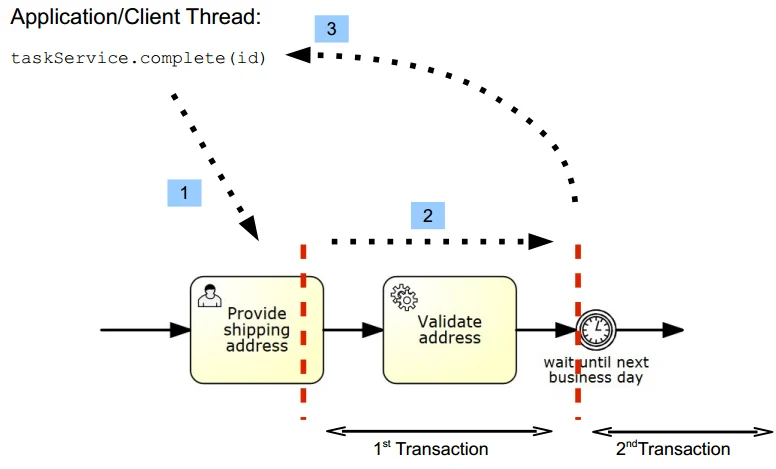
Asynchronous Continuations
Why Asynchronous Continuations?
In some cases the synchronous behavior is not desired. Sometimes it is useful to have custom control over transaction boundaries in a process. The most common motivation is the requirement to scope logical units of work. Consider the following process fragment: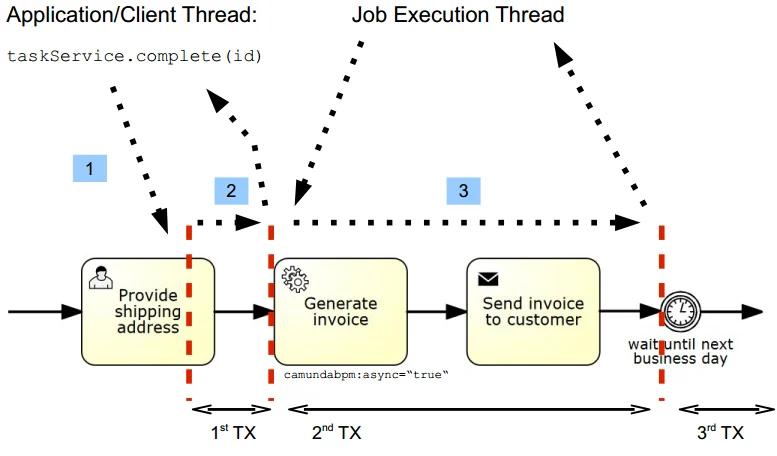
Configure Asynchronous Continuations
Asynchronous Continuations can be configured before and after an activity. Additionally, a process instance itself may be configured to be started asynchronously. An asynchronous continuation before an activity is enabled using thecamunda:asyncBefore extension
attribute:
camunda:asyncAfter extension
attribute:
camunda:asyncBefore
extension attribute on a process-level start event.
On instantiation, the process instance will be created and persisted in the database, but execution
will be deferred. Also, execution listeners will not be invoked synchronously. This can be helpful
in various situations such as heterogeneous clusters,
when the execution listener class is not available on the node that instantiates the process.
Asynchronous Continuations of Multi-Instance Activities
A multi-instance activity can be configured for asynchronous continuation like other activities. Declaring asynchronous continuation of a multi-instance activity makes the multi-instance body asynchronous, that means, the process continues asynchronously before the instances of that activity are created or after all instances have ended. Additionally, the inner activity can also be configured for asynchronous continuation using thecamunda:asyncBefore and camunda:asyncAfter extension attributes on the multiInstanceLoopCharacteristics element:
Understand Asynchronous Continuations
To understand how asynchronous continuations work, we first need to understand how an activity is executed: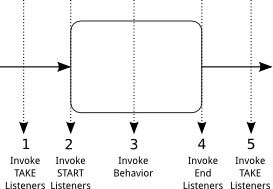
- The “TAKE” listeners are invoked on the sequence flow entering the activity.
- The “START” listeners are invoked on the activity itself.
- The behavior of the activity is executed: the actual behavior depends on the type of the
activity: in case of a
Service Taskthe behavior consists of invoking Delegation Code, in case of aUser Task, the behavior consists of creating aTaskinstance in the task list etc… - The “END” listeners are invoked on the activity.
- The “TAKE” listeners of the outgoing sequence flow are invoked.
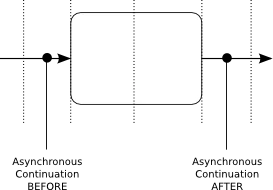
- An asynchronous continuation BEFORE an activity breaks the execution flow between the invocation of the incoming sequence flow’s TAKE listeners and the execution of the activity’s START listeners.
- An asynchronous continuation AFTER an activity breaks the execution flow between the invocation of the activity’s END listeners and the outgoing sequence flow’s TAKE listeners.
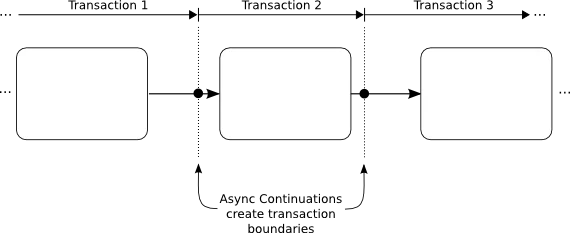
Rollback on Exception
We want to emphasize that in case of a non handled exception, the current transaction gets rolled back and the process instance is in the last wait state (save point). The following image visualizes that.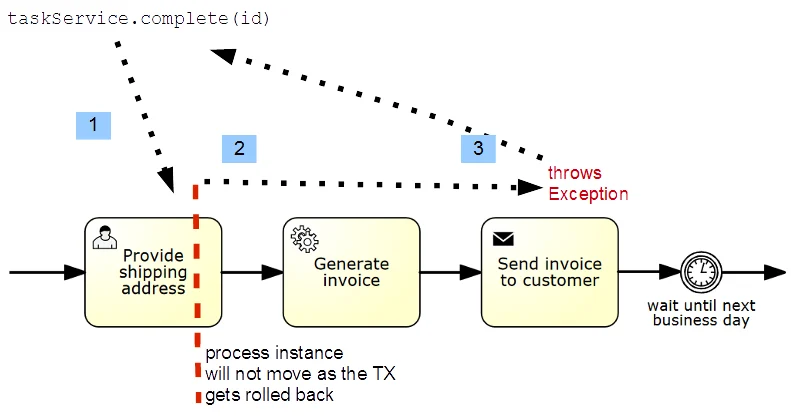
startProcessInstanceByKey the process instance will not be saved to the database at all.
Reasoning for This Design
The above sketched solution normally leads to discussion, as people expect the process engine to stop in case the task caused an exception. Also, other BPM suites often implement every task as a wait state. However, this approach has a couple of advantages:- In test cases you know the exact state of the engine after the method call, which makes assertions on process state or service call results easy.
- In production code the same is true; allowing you to use synchronous logic if required, for example because you want to present a synchronous user experience in the front-end.
- The execution is plain Java computing which is very efficient in terms of performance.
- You can always switch to ‘asyncBefore/asyncAfter=true’ if you need different behavior.
- In case of exceptions, the state is rolled back to the last persistent wait state of the process instance. It might even mean that the process instance will never be created! You cannot easily trace the exception back to the node in the process causing the exception. You have to handle the exception in the client.
- Parallel process paths are not executed in parallel in terms of Java Threads, the different paths are executed sequentially, since we only have and use one Thread.
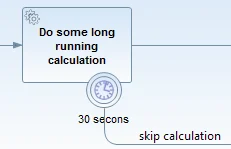
- Timers cannot fire before the transaction is committed to the database. Timers are explained in more detail later, but they are triggered by the only active part of the Process Engine where we use own Threads: The Job Executor. Hence they run in an own thread which receives the due timers from the database. However, in the database the timers are not visible before the current transaction is visible. So the following timer will never fire:
Transaction Integration
The process engine can either manage transactions on its own (“Standalone” transaction management) or integrate with a platform transaction manager.Standalone Transaction Management
If the process engine is configured to perform standalone transaction management, it always opens a new transaction for each command which is executed. To configure the process engine to use standalone transaction management, use theorg.camunda.bpm.engine.impl.cfg.StandaloneProcessEngineConfiguration:
In the Tomcat distribution the process engine is configured using standalone transaction management.
Transaction Manager Integration
The process engine can be configured to integrate with a transaction manager (or transaction management systems). Out of the box, the process engine supports integration with Spring and JTA transaction management. More information can be found in the following chapters: The use cases for transaction manager integration are situations where the process engine needs to integrate with- Transaction focused programming models such as Java EE or Spring (think about transaction scoped JPA entity managers in Java EE),
- Other transactional resources such as secondary datasources, messaging systems or other transactional middleware like the web services stack.
Transactions and the Process Engine Context
When a Process Engine Command is executed, the engine will create a Process Engine Context. The Context caches database entities, so that multiple operations on the same entity do not result in multiple database queries. This also means that the changes to these entities are accumulated and are flushed to the database as soon as the Command returns. However, it should be noted that the current transaction may be committed at a later time. If a Process Engine Command is nested into another Command, i.e. a Command is executed within another command, the default behaviour is to reuse the existing Process Engine Context. This means that the nested Command will have access to the same cached entities and the changes made to them. When the nested Command is to be executed in a new transaction, a new Process Engine Context needs to be created for its execution. In this case, the nested Command will use a new cache for the database entities, independent of the previous (outer) Command cache. This means that, the changes in the cache of one Command are invisible to the other Command and vice versa. When the nested Command returns, the changes are flushed to the database independently of the Process Engine Context of the outer Command. TheProcessEngineContext utility class can be used to declare to
the Process Engine that a new Process Engine Context needs to be created
in order for the database operations in a nested Process Engine Command
to be separated in a new transaction. The following Java code example
shows how the class can be used:
Optimistic Locking
The ASEE Flow Engine can be used in multi threaded applications. In such a setting, when multiple threads interact with the process engine concurrently, it can happen that these threads attempt to do changes to the same data. For example: two threads attempt to complete the same User Task at the same time (concurrently). Such a situation is a conflict: the task can be completed only once. ASEE Flow Engine uses a well known technique called “Optimistic Locking” (or Optimistic Concurrently Control) to detect and resolve such situations. This section is structured in two parts: The first part introduces Optimistic Locking as a concept. You can skip this section in case you are already familiar with Optimistic Locking as such. The second part explains the usage of Optimistic Locking in ASEE Flow.What is Optimistic Locking?
Optimistic Locking (also Optimistic Concurrency Control) is a method for concurrency control, which is used in transaction based systems. Optimistic Locking is most efficient in situations in which data is read more frequently than it is changed. Many threads can read the same data objects at the same time without excluding each other. Consistency is then ensured by detecting conflicts and preventing updates in situations in which multiple threads attempt to change the same data objects concurrently. If such a conflict is detected, it is ensured that only one update succeeds and all others fail.Example
Assume we have a database table with the following entry:| Id | Version | Name | Address | … |
|---|---|---|---|---|
| 8 | 1 | Steve | 3, Workflow Boulevard, Token Town | … |
| … | … | … | … | … |
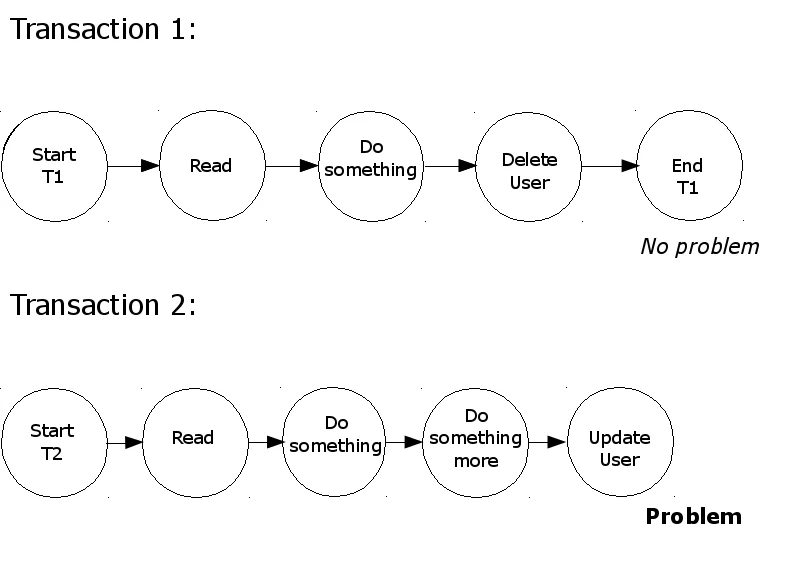
Transaction 1 reads the user data, does something with the data, deletes the user and then commits.
Transaction 2 starts at the same time and reads the same user data, and also works on the data. When Transaction 2 attempts to update the user address a conflict is detected (since Transaction 1 has already deleted the user).
The conflict is detected because the current state of the user data is read when Transaction 2 performs the update. At that time, the concurrent Transaction 1 has already marked the row to be deleted. The database now waits for Transaction 1 to end. After it is ended, Transaction 2 can proceed. At this time, the row does not exist anymore and the update succeeds but reports to have changed 0 rows. An application can react to this and rollback Transaction 2 to prevent other changes made by that transaction to become effective.
The application (or the user using it) can further decide whether Transaction 2 should be retried. In our example, the transaction would then not find the user data and report that the user has been deleted.
Optimistic Locking vs. Pessimistic Locking
Pessimistic Locking works with read locks. A read lock locks a data object on read, preventing other concurrent transactions from reading it as well. This way, conflicts are prevented from occurring. In the example above,Transaction 1 would lock the user data once it reads it. When attempting to read is as well, Transaction 2 is blocked from making progress. Once Transaction 1 completes, Transaction 2 can progress and reads the latest state. This way conflicts are prevented as transactions always exclusively work on the latest state of data.
Pessimistic Locking is efficient in situations where writes are as frequent as reads and with high contention.
However, since pessimistic locks are exclusive, concurrency is reduced, degrading performance. Optimistic Locking, which detects conflicts rather than preventing them to occur, is therefore preferable in the context of high levels of concurrency and where reads are more frequent than writes. Also, Pessimistic Locking can quickly lead to deadlocks.
Further Reading
Optimistic Locking in ASEE Flow
ASEE Flow uses Optimistic Locking for concurrency control. If a concurrency conflict is detected, an exception is thrown and the transaction is rolled back. Conflicts are detected when UPDATE or DELETE statements are executed. The execution of delete or update statements return an affected rows count. If this count is equal to zero, it indicates that the row was previously updated or deleted. In such cases a conflict is detected and anOptimisticLockingException is thrown.
The OptimisticLockingException
TheOptimisticLockingException can be thrown by API methods.
Consider the following invocation of the completeTask(...) method:
OptimisticLockingException in case executing the method call leads to concurrent modification of data.
Job execution can also cause an OptimisticLockingException to be thrown. Since this is expected, the execution will be retried.
Handling Optimistic Locking exceptions
In case the current Command is triggered by the Job Executor,OptimisticLockingExceptions are handled automatically using retries. Since this exception is expected to occur, it does not decrement the retry count.
If the current Command is triggered by an external API call, the ASEE Flow Engine rolls back the current transaction to the last save point (wait state). Now the user has to decide how the exception should be handled, if the transaction should be retried or not. Also consider that even if the transaction was rolled back, it may have had non-transactional side effects which have not been rolled back.
To control the scope of transactions, explicit save points can be added before and after activities using Asynchronous Continuations.
Common Places Where Optimistic Locking Exceptions Are Thrown
There a some common places where anOptimisticLockingException can be thrown.
For example
- Competing external requests: completing the same task twice, concurrently.
- Synchronization points inside a process: Examples are parallel gateway, multi instance, etc.
OptimisticLockingException can occur.
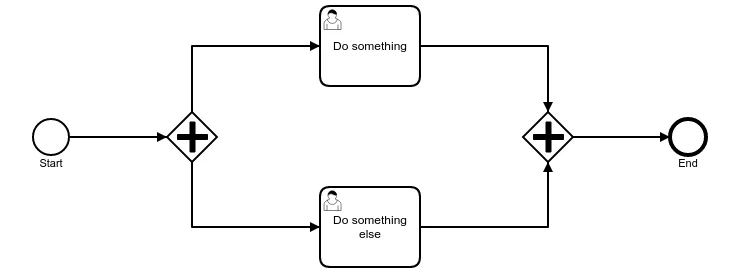
OptimisticLockingException is thrown. One of the transactions is rolled back and the other one succeeds to update the row.
Optimistic Locking and Non-Transactional Side Effects
After the occurrence of anOptimisticLockingException, the transaction is rolled back. Any transactional work will be undone.
Non-transactional work like creation of files or the effects of invoking non-transactional web services will not be undone. This can end in inconsistent state.
There are several solutions to this problem, the most common one is eventual consolidation using retries.
Internal Implementation Details
Most of the ASEE Flow Engine database tables contain a column calledREV_. This column represents the revision version.
When reading a row, data is read at a given “revision”. Modifications (UPDATEs and DELETEs) always attempt to update the revision which was read by the current command. Updates increment the revision. After executing a modification statement, the affected rows count is checked. If the count is 1 it is deduced that the version read was still current when executing the modification. In case the affected rows count is 0, other transaction modified the same data while this transaction was running. This means that a concurrency conflict is detected and this transaction must not be allowed to commit. Subsequently, the transaction is rolled back (or marked rollback-only) and an OptimisticLockingException is thrown.