

Variable Scopes and Variable Visibility
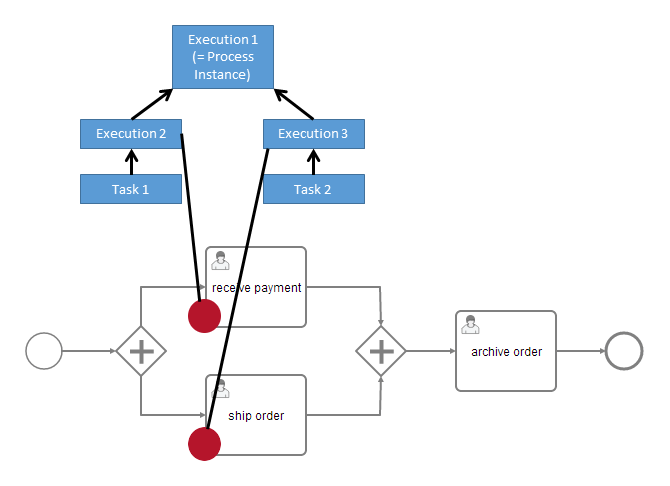
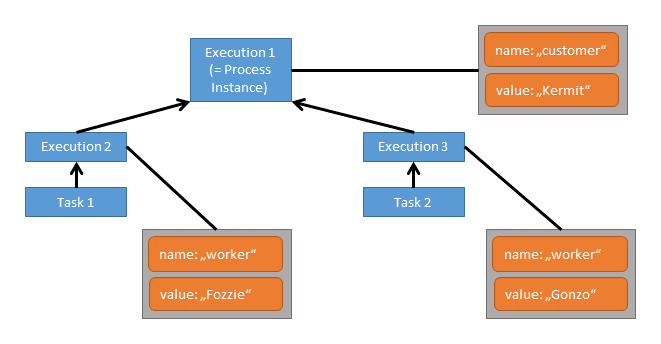
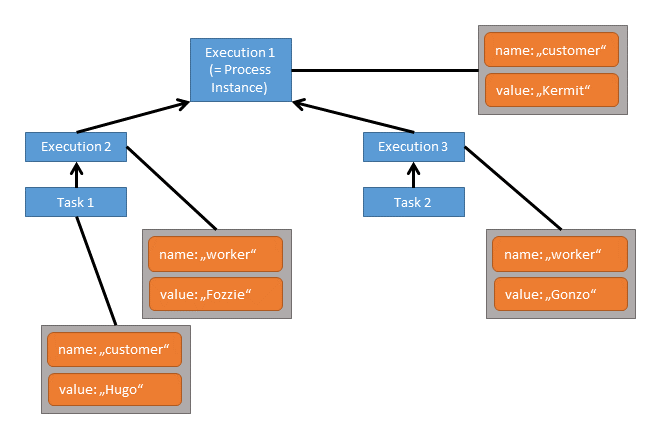
All entities that can have variables are called variable scopes. These are executions (which include process instances) and tasks. As described in the Concepts section, the runtime state of a process instance is represented by a tree of executions. Consider the following process model where the red dots mark active tasks: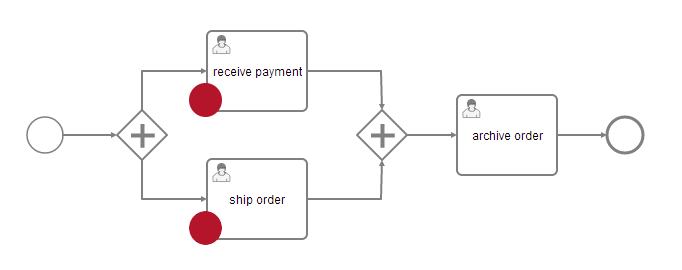
- Instantiating processes
- Delivering messages
- Task lifecycle transitions, such as completion or resolution
- Setting/getting variables from outside
- Setting/getting variables in a Delegate
- Expressions in the process model
- Scripts in the process model
- (Historic) Variable queries
Set and Retrieve Variables - Overview
To set and retrieve variables, the process engine offers a Java API that allows setting of variables from Java objects and retrieving them in the same form. Internally, the engine persists variables to the database and therefore applies serialization. For most applications, this is a detail of no concern. However, sometimes, when working with custom Java classes, the serialized value of a variable is of interest. Imagine the case of a monitoring application that manages many process applications. It is decoupled from those applications’ classes and therefore cannot access custom variables in their Java representation. For these cases, the process engine offers a way to retrieve and manipulate the serialized value. This boils down to two APIs:- Java Object Value API: Variables are represented as Java objects. These objects can be directly set as values and retrieved in the same form. This is the more simple API and is the recommended way when implementing code as part of a process application.
- Typed Value API: Variable values are wrapped in so-called typed values that are used to set and retrieve variables. A typed value offers access to metadata such as the way the engine has serialized the variable and, depending on the type, the serialized representation of the variable. Metadata also contains an information whether a variable is transient or not.
Setting variables to specific scope
There is a possibility to set variables into specific scope from scripts, input\output mapping, listeners and service tasks. Implementation of this functionality is using activity id in order to identify destination scope and will throw an exception if no scope is located to set a variable. Additionally, once target scope is found, variable will be set locally in it, which means that propagation to the parent scope will not be executed even if destination scope does not have a variable with given id. Here is example usage with script executionListener:DelegateVariableMapping implementation
Supported Variable Values
The process engine supports the following variable value types: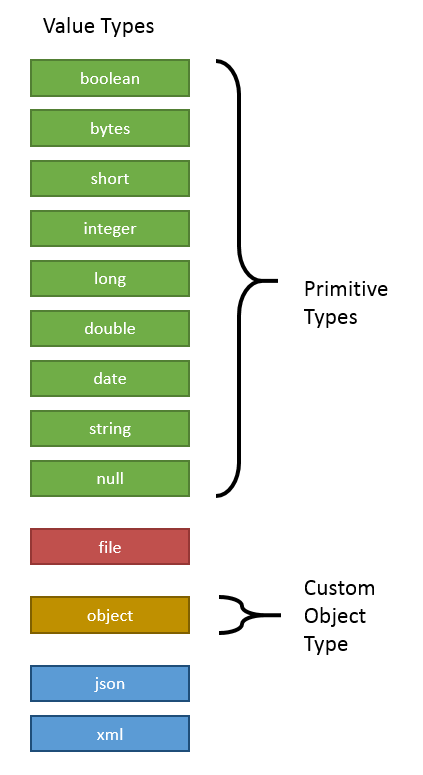
boolean: Instances ofjava.lang.Booleanbytes: Instances ofbyte[]short: Instances ofjava.lang.Shortinteger: Instances ofjava.lang.Integerlong: Instances ofjava.lang.Longdouble: Instances ofjava.lang.Doubledate: Instances ofjava.util.Datestring: Instances ofjava.lang.Stringnull:nullreferences
file can be used to store the contents of a file or input stream along with metadata such as a file name, an encoding, and the MIME type the file contents correspond to.
The value type object represents custom Java objects. When such a variable is persisted, its value is serialized according to a serialization procedure. These procedures are configurable and exchangeable.
Process variables can be stored in formats like JSON and XML provided by the ASEE Flow Spin plugin. Spin provides serializers for the variables of type object such that Java variables can be persisted in these formats to the database. Furthermore, it is possible to store JSON and XML documents directly as a Spin object by the value types xml and json. Opposed to plain string variables, Spin objects provide a fluent API to perform common operations on such documents like reading and writing properties.
Object Value Serialization
When anobject value is passed to the process engine, a serialization format can be specified to tell the process engine to store the value in a specific format. Based on this format, the engine looks up a serializer. The serializer is able to serialize a Java object to the specified format and deserialize it from a representation in that format. That means, there may be different serializers for different formats and it is possible to implement custom serializers in order to store custom objects in a specific format.
The process engine ships one built-in object serializer for the format application/x-java-serialized-object. It is able to serialize Java objects that implement the interface java.io.Serializable and applies standard Java object serialization.
The desired serialization format can be specified when setting a variable using the Typed Value API:
defaultSerializationFormat that is used when no specific format is requested. This option defaults to application/x-java-serialized-object.
Using Custom Objects in Task FormsNote that the built-in serializer converts objects to byte streams that can only be interpreted with the Java class at hand. When implementing task forms that are based on complex objects, a text-based serialization format should be used since Tasklist cannot interpret these byte streams. See the box Serializing Objects to XML and JSON for details on how to integrate serialization formats like XML and JSON.
Serializing Objects to XML and JSONThe ASEE Flow Spin plugin provides serializers that are capable of serializing object values to XML and JSON. They can be used when it is desired that the serialized objects values can be interpreted by humans or when the serialized value should be meaningful without having the corresponding Java class. When using a pre-built ASEE Flow distribution, ASEE Flow Spin is already preconfigured and you can try these formats without further configuration.
Java Object API
The most convenient way of working with process variables from Java is to use their Java object representation. Wherever the process engine offers variable access, process variables can be accessed in this representation given that for custom objects the engine is aware of the involved classes. For example, the following code sets and retrieves a variable for a given process instance:Typed Value API
In cases in which it is important to access a variable’s serialized representation or in which the engine has to be hinted to serialize a value in a certain format, the typed-value-based API can be used. In comparison to the Java-Object-based API, it wraps a variable value in a so-called Typed Value. Such a typed value allows richer representation of variable values. In order to easily construct typed values, ASEE Flow offers the classorg.camunda.bpm.engine.variable.Variables. This class contains static methods that allow creation of single typed values as well as creation of a map of typed values in a fluent way.
Primitive Values
The following code sets a singleString variable by specifying it as a typed value:
File Values
Of course, for plainString values, the Java-Object-based API is more concise. Let us therefore consider values of richer data structures.
Files can be persisted as BLOBs in the database. The file value type allows to store additional metadata such as a file name and a mime type along with it. The following example code creates a file value from a text file:
Changing a File Value
To change or update afile value, you have to create a new FileValue with the same name and the new content, because all typed values are immutable:
Object Values
Custom Java objects can be serialized with the value typeobject. Example using the typed value API:
ObjectValue instance provides additional variable details:
com.example.Order is not known). In these cases, runtimeService.getVariableTyped(execution.getId(), "order") will raise an exception since it immediately tries to deserialize the variable value. In such a case, the invocation runtimeService.getVariableTyped(execution.getId(), "order", false) can be used. The additional boolean parameter tells the process engine to not attempt deserialization. In this case, the invocation isDeserialized() will return false and invocations like getValue() and getObjectType() will raise exceptions. Calling getValueSerialized() and getObjectTypeName() is a way to access the variable nonetheless.
Similarly, it is possible to set a variable from its serialized representation:
JSON and XML Values
The ASEE Flow Spin plugin provides an abstraction for JSON and XML documents that facilitate their processing and manipulation. This is often more convenient than storing such documents as plainstring variables. See the documentation on ASEE Flow SPIN for storing JSON documents and storing XML documents for details.
Transient variables
Declaration of transient variables is possible only through the typed-value-based API. They are not saved into the database and exist only during the current transaction. Every waiting state during an execution of a process instance leads to the loss of all transient variables. This happens typically when e.g. an external service is not currently available, an user task has been reached or the process execution is waiting for a message, a signal or a condition. Please use this feature carefully. Variables of any type can be declared as transient using theVariables class and setting the parameter isTransient to true.
Set Multiple Typed Values
Similar to the Java-Object-based API, it is also possible to set multiple typed values in one API call. TheVariables class offers a fluent API to construct a map of typed values:
Interchangeability of APIs
Both APIs offer different views on the same entities and can therefore be combined as is desired. For example, a variable that is set using the Java-Object-based API can be retrieved as a typed value and vice versa. As the classVariableMap implements the Map interface, it is also possible to put plain Java objects as well as typed values into this map.
Which API should you use? The one that fits your purpose best. When you are certain that you always have access to the involved value classes, such as when implementing code in a process application like a JavaDelegate, then the Java-Object-based API is easier to use. When you need to access value-specific metadata such as serialization formats or to define a variable as transient, then the Typed-Value-based API is the way to go.
Input/Output Variable Mapping
To improve the reusability of source code and business logic, ASEE Flow offers input/output mapping of process variables. This can be used for tasks, events and subprocesses. In order to use the variable mapping, the ASEE Flow extension element inputOutput has to be added to the element. It can contain multiple inputParameter and outputParameter elements that specify which variables should be mapped. Thename attribute of an inputParameter denotes
the variable name inside the activity (a local variable to be created), whereas the name attribute of an outputParameter
denotes the variable name outside of the activity.
The content of an input/outputParameter specifies the value that is mapped to the corresponding
variable. It can be a simple constant string or an expression. An empty body sets the variable
to the value null.
org.camunda.bpm.example.ComplexCalculation.
This delegate requires a userId and a costSum variable as input
parameters. It then calculates three values, pessimisticForecast, realisticForecast and optimisticForecast,
which are different forecasts of the future costs a customer faces. In a first process, both input variables are available as process variables but with different names (id, sum). From the three results, the process only uses realisticForecast which it depends on by the name forecast in follow-up activities. A corresponding input/output mapping looks as follows:
costSum variable has to be calculated from properties of three different maps. Also, the process
depends on a variable avgForecast as the average value of the three forecasts. In this case, the mapping looks as follows:
Multi-instance IO Mapping
Input mappings can also be used with multi-instance constructs, in which the mapping is applied for every instance that is created. For example, for a multi-instance subprocess with five instances, the mapping is executed five times and the involved variables are created in each of the five subprocess scopes such that they can be accessed independently.No output mapping for multi-instance constructsThe engine does not support output mappings for multi-instance constructs. Every instance of the output mapping would overwrite the variables set by the previous instances and the final variable state would become hard to predict.
IO Mapping on canceled activities
If an Activity is canceled (e.g. due to throwing a BPMN error), IO mapping is still executed. This can lead to exceptions if the output mapping references variables that do not exist in the scope of the activity at that time. The default behavior is that the engine still tries to execute output mappings on canceled activities and fails with an exception if a variable is not found. By enabling the skipOutputMappingOnCanceledActivities engine configuration flag (i.e. setting it totrue) the engine will not perform output mappings on any canceled activity.