

- Restoring the last state of process instances that have been erroneously canceled
- Restarting process instances after a termination caused by a wrong decision
RuntimeService.restartProcessInstances(...). This API allows to specify multiple instantiation instructions in one call by using a fluent builder.
Note that these operations are also available via REST: Restart Process Instance and Restart Process Instance (async)
Process Instance Restart by Example
As an example, consider the following process model where the red dots mark active tasks: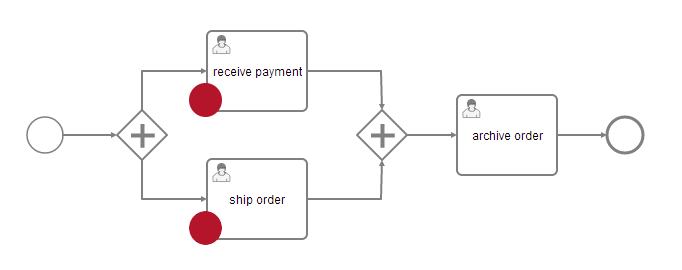
RuntimeService.setVariableLocal(...).
Technically, a new process instance has been created.Please note:
The ids of the historic and the restarted process instance are different.
Operational Semantics
In the following, the exact semantics of the process instance restart feature are documented. Reading this section is recommended to fully understand the effects, power and limitations of this feature.Instantiation Instruction Types
The fluent process instance restart builder offers the following instructions to be submitted:startBeforeActivity(String activityId)startAfterActivity(String activityId)startTransition(String transitionId)
Selecting process instances to restart
Process instances can be selected for restart by either providing a set of process instance ids or providing a historic process instance query. It is also possible to specify both, a list of process instance ids and a query. The process instances to be restarted will then be the union of the resulting sets.List of Process Instances
The process instances which should be restarted can either be specified as a list of the process instance ids:Historic Process Instance Query
If the instances are not known beforehand, the process instances can be selected by a historic process instance query:Skipping Listeners and Input/Output Mappings
It is possible to skip invocations of execution and task listeners as well as input/output mappings for the transaction that performs the restart. This can be useful when the restart is executed on a system that has no access to the involved process application deployments and their contained classes. In the API, the two methods#skipCustomListeners and #skipIoMappings
can be used for this purpose:
Restarting a Process Instance With the Initial Set of Variables
By default, a process instance is restarted with the last set of variables. To alternatively choose the initial set of variables, theinitialSetOfVariables method is used.
This feature does not only copy the start variables, but will copy the first version of all process variables that have been set in the start activity of the old process instance.
Omitting the Business Key of a Historic Process Instance
By default, a process instance is restarted with the same business key as the historic process instance. By using the methodwithoutBusinessKey, the business key of the restarted process instance is not set.
Execution
The restart can either be executed synchronously (blocking) or asynchronously (non-blocking) by using a batch . The following are some reasons to prefer either one or the other:-
Use synchronous execution if:
- the number of process instances is small
- the restart should be atomic, i.e., it should be executed immediately and should fail if at least one process instance cannot be restarted
-
Use asynchronous execution if:
- the number of process instances is large
- all process instances should be restarted decoupled from the other instances, i.e., every instance is restarted in its own transaction
- the restart should be executed by another thread, i.e., the job executor should handle the execution
Synchronous execution
To execute the restart synchronously, theexecute method is used. It will
block until the restart is completed.
Asynchronous batch execution
To execute the restart asynchronously, theexecuteAsync method is used. It will
return immediately with a reference to the batch that executes the restart.